Prakash@gmail.com
7 Best Calendar Apps Managing time is something most of us struggle with more than we’d like to admit. Between work meetings, personal appointments, and just trying to remember what day it is — a good calendar app makes a real difference. Not just any app, but one that actually fits how you work.
I’ve been testing and using calendar apps on Android for years now, and honestly, the options in 2026 are better than ever. Some are simple and clean. Others are packed with features. Here’s a breakdown of the seven best ones worth your time.
1. Google Calendar — Still the Most Reliable Option
If you’re on Android, Google Calendar is usually already installed. And there’s a reason it sticks around — it just works.
The sync is instant across devices. You add something on your phone, it shows up on your laptop within seconds. For most people, that alone is enough. It connects smoothly with Gmail too, so flight confirmations or event invites get added automatically without any manual input.
The interface is clean, the color-coding system is intuitive, and the week/day/month views are easy to switch between. Nothing feels buried.
7 Best Calendar Apps What Makes It Stand Out
Google Calendar’s “Goals” feature is underrated. You tell it you want to exercise three times a week, and it finds gaps in your schedule and places those sessions automatically. It sounds small, but it genuinely helps with building habits.
For Android users especially, this remains the go-to starting point.
2. Fantastical — Best for Power Users Who Want Everything in One Place
Fantastical has a reputation, and it deserves it. If you’re the type of person who manages multiple calendars, has back-to-back meetings, and wants a serious scheduling tool — this is it.
The natural language input is where it shines. You type something like “Dentist appointment Thursday at 3pm” and it creates the event, assigns it to the right calendar, and sets a reminder. No forms to fill out.
It combines your calendar and tasks in a single view, which is something a lot of apps separate unnecessarily.
7 Best Calendar Apps The Downside
It’s subscription-based. Some features are locked behind the premium plan. For casual users, that might not be worth it. But if you’re managing a busy schedule professionally, the cost is easy to justify.
3. Microsoft Outlook Calendar — Underrated for Work Schedules
Most people think of Outlook as just an email app. But the calendar that comes with it is genuinely solid, especially if your workplace uses Microsoft 365.
Meeting invites, shared calendars, and room bookings all integrate naturally. It’s built for that kind of environment. If your team already lives inside Teams or Office apps, keeping your calendar in Outlook means fewer tools to juggle.
The interface has improved a lot over the last couple of years. It’s no longer the clunky experience it used to be on mobile.
7 Best Calendar Apps When to Choose Outlook Calendar
If your job revolves around scheduled meetings and your company uses Microsoft tools, switching to a separate calendar app may actually create more friction. Sometimes the best app is the one already in your workflow.
4. Any.do Cal — Simple Design, Surprisingly Useful
Any.do is primarily known as a task manager, but their calendar integration is worth mentioning. The combined view of tasks and events in one timeline is something that genuinely reduces the number of apps you need open.
It’s not as feature-rich as Fantastical, but that’s also what makes it accessible. The interface is minimal. Adding events takes a few taps. For someone who wants just enough without the learning curve, this hits the mark.
5. Reclaim.ai Calendar — AI-Powered Smart Scheduling
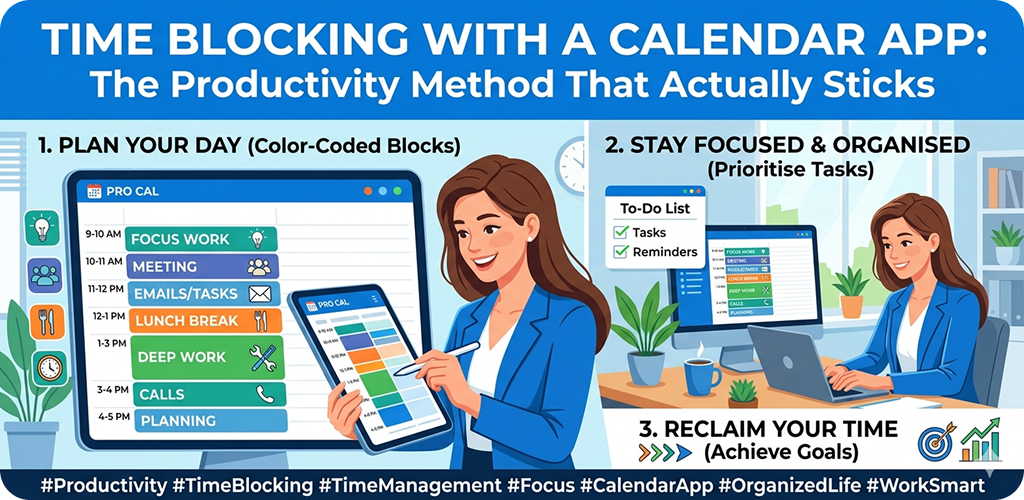
This one is newer territory. Reclaim.ai uses AI to intelligently block time on your calendar for tasks, habits, and focus work. You connect it with Google Calendar, tell it your priorities, and it manages your schedule around your existing commitments.
What’s interesting is how it handles rescheduling. If a meeting pops up during your focus block, Reclaim automatically moves that block to another open slot during the day.
7 Best Calendar Apps Who Benefits Most
Remote workers and freelancers who manage their own schedules without a boss assigning their time — they get the most out of this. It essentially acts like a smart assistant for your calendar without needing to hire anyone.
It’s not for everyone, but if you’ve ever looked at your week and thought “I have no idea when I’m actually going to get this done” — Reclaim answers that question automatically.
6. Zoho Calendar — A Solid Pick for Small Business Owners
Zoho doesn’t get as much attention in these conversations, but for someone running a small business or working within the Zoho ecosystem, this calendar is genuinely practical.
It integrates with Zoho CRM, Zoho Mail, and other Zoho tools. If you’re already using those, having the calendar connected means your client meetings, follow-up tasks, and communications all live in one place.
The interface is fairly standard — nothing revolutionary — but the depth of integration with business tools makes it a strong choice for a specific audience.
7. TimeTree — Best for Shared Family or Group Scheduling
TimeTree solves a specific problem: coordinating schedules with people you actually live with or regularly plan around. Whether that’s a partner, your family, or a small team — this app makes shared scheduling feel less like a chore.
Each calendar is shared by default, and everyone can add events, notes, and comments directly on each entry. You don’t need to send invite links or wait for someone to accept. It’s collaborative from the start.
7 Best Calendar Apps A Real-Life Example
Say you and your partner both have different work hours, and you’re trying to figure out when to schedule a doctor’s visit or a grocery run. TimeTree shows both schedules side by side and lets either of you add things without confusion.
For families especially, this replaces a lot of back-and-forth messaging.
Google Calendar vs Apple Calendar: Which Is Better for Your Workflow in 2026?
This comparison comes up constantly, and the honest answer is: it depends on what devices you’re using and what matters to you.
7 Best Calendar Apps Platform Loyalty Plays a Big Role
Apple Calendar is deeply embedded in the iOS and macOS ecosystem. If you use an iPhone, a MacBook, and an iPad — the sync is seamless. Events update across all of them instantly. Siri integrates naturally. The design is clean and uncluttered.
Google Calendar, on the other hand, works well on everything. Android, iOS, Windows, Mac — it doesn’t care what device you’re on. That cross-platform flexibility is a real advantage for people who don’t stick to one brand.
Feature Differences That Actually Matter
Google Calendar has a slight edge in smart features. The Goals tool, Gmail integration, and AI-assisted event suggestions are genuinely useful for people who want their calendar to do a bit of thinking for them.
Apple Calendar is more straightforward. You add events, you see them. It doesn’t try to suggest anything or reorganize your day. Some people prefer that. There’s no clutter, no AI nudges — just your schedule.
7 Best Calendar Apps Collaboration and Sharing
Google Calendar makes it easier to share calendars with people outside your household — colleagues, clients, collaborators. The sharing controls are simple and the experience is consistent across platforms.
Apple Calendar can share too, but it works best within Apple’s ecosystem. Sharing with someone on Android is a bit more awkward.
The Verdict
For Android users and people who switch between devices or operating systems — Google Calendar wins comfortably. For someone fully committed to Apple products who prefers a minimal, no-fuss experience — Apple Calendar is perfectly sufficient.
Neither is objectively better. It’s about where you live digitally.
Final Conclusion
Calendar apps in 2026 are much more than just digital planners. The best ones now adapt to your habits, connect with your other tools, and actually help you use your time more deliberately.
For most people, Google Calendar remains the practical starting point — especially on Android. But depending on your situation, something like Reclaim.ai might genuinely change how productive your weeks feel. And if you’re coordinating with others constantly, TimeTree solves problems that most apps don’t even address.
The key is picking something you’ll actually open every day. A perfect app you ignore doesn’t help anyone.
If you’re unsure where to start, Google Calendar’s scheduling features are free and available on every device — a low-risk place to begin. For team-based scheduling, exploring how Microsoft Outlook Calendar integrates with workplace tools can save you a lot of back-and-forth. And for AI-assisted time blocking, Reclaim.ai’s smart scheduling is worth a look if managing tasks alongside meetings is a daily challenge.