Prakash@gmail.com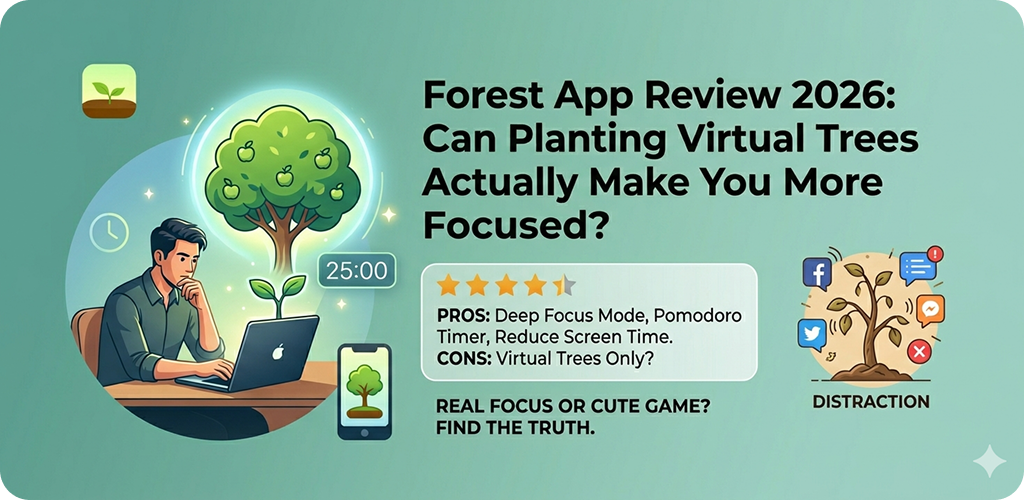
Introduction
Forest App Review I’ll be honest — when someone first told me to “plant a tree on my phone” to stop scrolling mindlessly, I laughed a little. It sounded like one of those gimmicky productivity ideas that look great in screenshots but fall apart in real use. But after spending a few weeks with Forest, I actually changed my mind. Not completely, but enough to write this.
So here’s a real, no-fluff look at what Forest does, how it works on Android, and whether it’s actually worth your time in 2026.
Forest App Review What Is the Forest App, Exactly?
Forest is a focus timer app built around a simple idea. You set a timer, plant a virtual seed, and as long as you don’t leave the app, that seed grows into a tree. If you pick up your phone and start scrolling Instagram or opening YouTube mid-session, the tree dies.
That’s basically it. But the execution is what makes it interesting.
The app uses a combination of the Pomodoro technique and mild behavioral psychology — specifically, the small emotional discomfort of “killing” something you started growing. It’s surprisingly effective, even if you know exactly what it’s doing.
It’s available on Android, iOS, and also works as a Chrome extension for laptop-based focus sessions.
Forest App Review How the App Works on Android
When you open Forest on Android, you’re greeted with a clean interface. You pick a plant (there are many unlockable options), set your focus time — anywhere from 10 minutes to 2 hours — and hit “Plant.”
Your phone screen can be locked or left alone, but the moment you navigate away from Forest to open another app, a warning pops up. If you keep going, the tree dies and you get a little withered branch in your forest. Over time, your sessions build up a visual forest of trees and plants, with each one representing a block of focused time.
There’s also a map feature that shows a real-world forest being planted as you earn coins. The app partners with Trees for the Future, and users can spend in-app coins to plant actual trees. That part feels genuinely good, not just a marketing angle.
Forest App Review The Gamification Layer: Does It Actually Help?
This is where opinions get split. Some people find the gamification incredibly motivating. Others say it wears off after a week.
In my experience, it depends on your personality. If you’re someone who gets mild satisfaction from streaks, collections, or visual progress — Forest clicks. Seeing your little grove fill up with trees over a week feels genuinely rewarding.
But if you’re the type who can rationalize anything (“I’ll just check one message, it’s fine”), Forest won’t stop you. The app doesn’t lock your phone. It just makes you feel a little bad for breaking focus. That emotional friction is the entire mechanism.
For beginners who are just starting to build focus habits, that friction is often enough. For people with severe distraction problems, it might need to be paired with something stronger, like an app blocker.
Forest App Review Deep Stay: The Strict Mode Feature
Android users have access to a feature called Deep Stay (or similar variations depending on your device and OS version). This integrates with Android’s accessibility settings to actually prevent you from leaving the Forest app during a session.
It’s a much more firm version of the standard experience. Once you enable it and start a session, you genuinely cannot switch apps without explicitly going through a couple of steps to cancel. It’s not impossible to override, but it adds enough friction that most people just… don’t bother.
If you’re serious about using Forest as a focus tool rather than a decorative timer, this is the setting you want to turn on.
To enable it, go to Settings > Accessibility > Installed Apps > Forest, and toggle the relevant permission. It’s worth the 30 seconds.
Forest App Review What’s New in 2026: Recent Updates Worth Knowing
Forest has been around since 2014, so it’s a mature app. But the 2025–2026 updates brought a few meaningful changes.
Better Widget Support
The Android home screen widget is now more functional. You can start a session directly from the widget without opening the app, which removes a small but real bit of friction.
Collaborative Planting
The co-plant feature — where you and a friend or study partner plant trees together — has been improved. If either person leaves the app, both trees die. It adds light social accountability, which some users find surprisingly powerful, especially students studying together remotely.
Theme and Customization Expansion
There are more plant types and seasonal themes now. It’s cosmetic, but it does keep the app feeling fresh rather than repetitive.
Forest App Review Free vs. Premium: What Do You Actually Get?
The free version of Forest is functional. You get the core planting mechanic, basic plants, and a limited coin system.
The premium version (a one-time purchase of around $1.99–$3.99 depending on your region) unlocks more plant types, white noise sounds, detailed statistics, and the ability to tag your focus sessions by category (work, study, reading, etc.).
The statistics feature is underrated. Being able to look back and see exactly when and how long you focused each day — broken down by category — is genuinely useful for people trying to build better habits.
If you find the free version useful after a week, the one-time purchase is worth it. There’s no subscription, which is increasingly rare for apps these days.
Honest Limitations of Forest
No app is perfect, and Forest has a few things worth knowing before you commit.
It doesn’t block other apps. Without Deep Stay enabled, it’s entirely honor-system. Determined distraction will win.
The coin system can feel slow. Earning enough coins to unlock better plants takes time, which either feels motivating or mildly annoying depending on your patience.
No built-in task list. Forest is purely a timer. It doesn’t integrate with to-do lists or project management tools natively. You’ll need to manage your actual task list separately.
Background app limitations on some Android devices. On phones with aggressive battery optimization (looking at you, Xiaomi and some Samsung variants), Forest can occasionally get killed in the background, ending your session unintentionally. You may need to whitelist it in your battery settings.
Who Is Forest Actually Good For?
Forest works best for a specific kind of person:
Someone who already wants to focus, but keeps getting pulled away by habit rather than urgent need. It works well for students, remote workers, writers, and anyone trying to reclaim a few hours of deep work per day.
It’s less effective for people who need absolute app blocking, or those who are deeply skeptical of gamified productivity. If you roll your eyes at virtual trees, no amount of nice UI will change that.
But if you can engage with the metaphor even slightly — and genuinely feel that tiny pang when a tree dies — Forest is one of the more elegant focus tools available on Android right now.
A Quick Note on Screen Time Habits
If you’re exploring apps like Forest, you might also find it helpful to look into how Android’s Digital Wellbeing tools work alongside focus apps. Using them together gives you both emotional motivation (Forest) and hard data (Digital Wellbeing) about your actual phone usage patterns.
Some Android users also pair Forest with grayscale mode to make their phone less visually stimulating during focus sessions — a low-tech but surprisingly effective trick.
Final Conclusion
Forest isn’t magic. It won’t fix a deeply scattered mind on its own, and it’s not going to stop someone who’s determined to scroll. But what it does — gently, cleverly — is add a small moment of pause between impulse and action. That pause, multiplied over days and weeks, actually adds up.
The app is clean, the concept is simple, and the one-time payment model means there’s no ongoing cost to stay committed to it. For Android users in 2026 who want a low-pressure but genuinely useful focus companion, Forest is still one of the better choices out there.
Give the free version a real week. If you find yourself caring whether the tree lives or dies, that’s your sign it’s working.