Prakash@gmail.com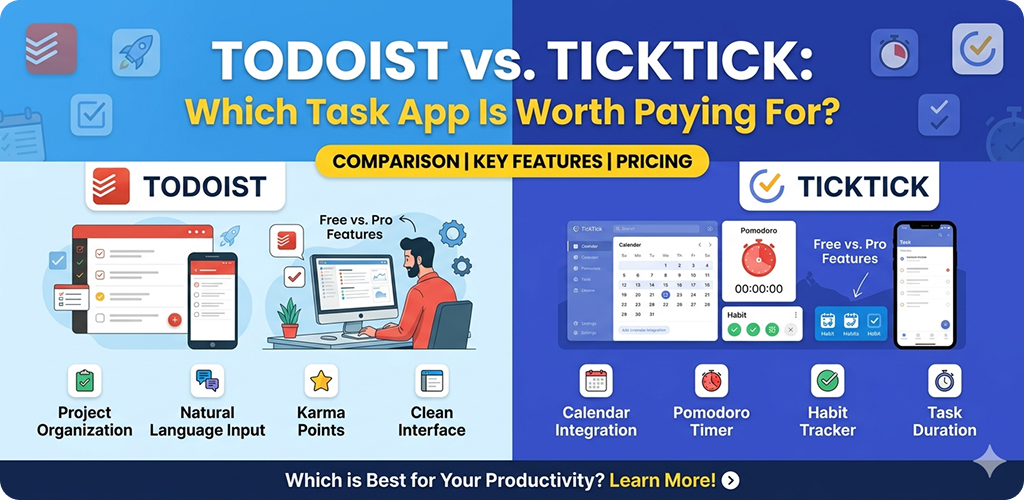
If you have ever felt like your brain is a browser with sixty tabs open, you are probably in the market for a solid task manager. On the Android side of things, two names always bubble up to the surface: Todoist vs TickTick. Both apps are veterans in the space, but they approach productivity from very different angles.
I have spent years bouncing between these two. One month, I am obsessed with Todoist’s clean lines; the next, I am back to TickTick because I missed its built-in timer. If you are sitting on the fence, wondering which one deserves your hard-earned subscription money, let’s break down the real-world experience of using them.
Todoist vs TickTick The Core Philosophy: Simplicity vs. Utility
The biggest difference between these two isn’t just a button or a color—it is how they think you should work. Todoist is the minimalist. It wants to get out of your way. When you open it on your phone, you see a clean list. There is no clutter. It focuses entirely on task management.
TickTick, on the other hand, wants to be your entire productivity hub. It is like a Swiss Army knife. It doesn’t just do tasks; it tracks your habits, offers a Pomodoro timer, and includes a full-blown calendar. While Todoist tries to be the best at one thing, TickTick tries to be the only app you ever need to open.
Todoist vs TickTick Capturing Tasks on the Go
On Android, speed is everything. You need to be able to dump a thought into your phone before it vanishes.
Todoist is the undisputed king of “Natural Language Input.” This sounds fancy, but it just means you can type “Doctor appointment Friday at 2pm #Health” and it instantly knows the date, the time, and which project to put it in. It feels almost like magic. If you are walking and using the Google Assistant integration, it rarely misses a beat.
TickTick also has natural language input, and it is quite good, but it occasionally stumbles on more complex phrasing. However, TickTick has a killer feature for Android users: a persistent notification bar and excellent widgets. You can add a task directly from your notification shade without even opening the app. For some, that second saved is a game-changer.
Todoist vs TickTick The Feature Deep Dive: What Do You Actually Get?
When you start looking at the paid tiers, the “value” starts to look very different depending on your workflow.
Todoist Pro Features
Todoist keeps its most powerful organizational tools behind the paywall. If you pay for Pro, you get:
- Reminders: Surprisingly, you don’t get automated reminders in the free version. This is the biggest “push” to upgrade.
- Filters: You can create incredibly specific views, like “Show me all work tasks due today that are high priority.”
- AI Assistant: Recently, Todoist added AI tools to help break down big tasks into smaller, manageable steps.
TickTick Premium Features
TickTick gives you a lot of the “basics” for free (including reminders), but the Premium version unlocks the heavy hitters:
- Full Calendar View: This is TickTick’s “secret sauce.” You can see your tasks alongside your actual Google Calendar events.
- Custom Smart Lists: Similar to Todoist filters, but easier to set up for beginners.
- Advanced Pomodoro: You get detailed statistics on how long you actually focused on specific tasks.
Todoist vs TickTick Why Todoist Might Be Worth the Price
If you work in a professional setting or use a lot of different tools, Todoist is likely the better investment. Its integration ecosystem is massive. It talks to Slack, Gmail, Outlook, and even specialized tools like IFTTT or Zapier effortlessly.
There is also a “polish” to Todoist that is hard to describe. The animations are smoother, the sync between your phone and desktop is instantaneous, and it rarely bugs out. It feels like a premium tool because it behaves like one. If your work involves collaborating with others, Todoist’s “Workspaces” are much more robust for assigning tasks to team members.
Todoist vs TickTick Why TickTick Might Be the Better Deal
TickTick is generally cheaper than Todoist, and you get “more” for that lower price. If you are a student or a freelancer who needs to stay disciplined, having a Habit Tracker and a Pomodoro Timer inside the same app where your tasks live is incredibly convenient.
Think about it: instead of having three different apps for your to-do list, your gym habits, and your study timer, you just have one. This reduces “app fatigue.” For many Android users, the sheer variety of TickTick’s widgets—which are highly customizable—makes it feel more at home on the platform than Todoist’s more rigid design.
Todoist vs TickTick The Android Experience
Both apps have spent a lot of time making their Android versions feel “native.” They support Material You (the system where the app colors match your wallpaper) and have great haptic feedback.
However, I have noticed that TickTick sometimes feels a little more “cluttered” on smaller screens because it tries to cram so many features into the bottom navigation bar. Todoist feels breathable. If you have a phone with a massive screen, TickTick’s “three-pane view” (if you use it in landscape or on a tablet) is actually much more productive than Todoist’s simpler layout.
Which One Is “Easier” for Beginners?
If you are just starting out, Todoist has a much shallower learning curve. You open it, you type, you’re done. You don’t have to worry about “folders vs. lists” or “Eisenhower matrices” unless you want to.
TickTick can be a bit overwhelming at first. You might see the habit tracker and the calendar and the “Focus” section and feel like you aren’t using the app “right” if you don’t use all of them. But if you are the type of person who loves to tweak settings and customize every single corner of your digital life, you will have a lot more fun with TickTick.
Final Conclusion
Todoist vs TickTick Choosing between Todoist and TickTick really comes down to one question: Do you want a dedicated task manager or a total productivity system?
Todoist is worth paying for if you value a clean, distraction-free environment and need top-tier integrations for your professional work. It is the gold standard for “Getting Things Done” without the fluff. The natural language input is so good that it actually changes how you think about scheduling your day.
TickTick is the better value if you want to consolidate your tools. For a lower price, you get a calendar, habit tracker, and focus timer built-in. It’s the better choice for individuals who want to manage their whole life—from drinking enough water to finishing a work project—in a single place.
Todoist vs TickTick Both apps offer free versions that are quite generous. My advice? Use each one for exactly three days. By the end of the week, you will know which one “clicks” with your brain.