Prakash@gmail.com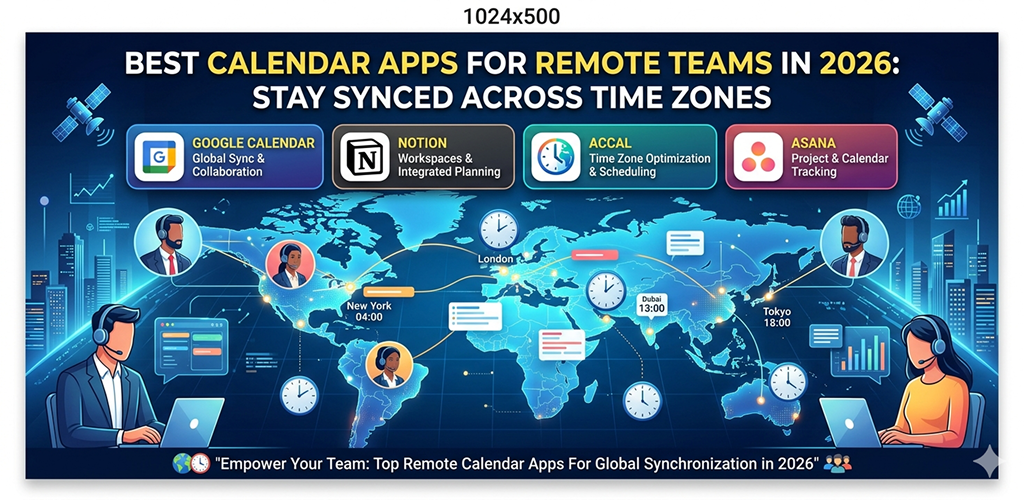
Calendar Apps for Working remotely sounds great on paper. No commute, flexible hours, work in your pajamas if you want. But anyone who’s actually done it knows the real headache — coordinating with teammates scattered across different cities, countries, and time zones.
I’ve been part of remote teams for a few years now, and the single biggest thing that trips people up isn’t motivation or productivity. It’s scheduling. Someone in Mumbai sets a meeting for 10 AM, not realizing their colleague in Toronto is still asleep. Things slip. Deadlines get missed. Frustration builds.
The right calendar app genuinely fixes most of this. Not all of them, but a good chunk. Let me walk you through what’s actually worth using in 2026, and more importantly, why.
Calendar Apps for Why Remote Teams Need More Than a Basic Calendar
Your phone’s default calendar — whether you’re on Android or iPhone — works fine for personal appointments. Doctor visits, birthday reminders, that kind of thing. But remote team coordination is a different beast entirely.
You need something that shows multiple time zones at once, lets teammates see each other’s availability without back-and-forth emails, and ideally connects with your other tools like Slack, Zoom, or project management software.
The apps that do this well have become genuinely essential for distributed teams.
Calendar Apps for What to Actually Look For Before Picking an App
Before jumping into specific recommendations, it’s worth understanding what separates a useful calendar app from one that just looks pretty.
Time Zone Intelligence
This is non-negotiable. The app should automatically detect time zones or at least let you set multiple ones in a single view. Some apps let you pin two or three time zones alongside your local time — this is incredibly helpful when you’re constantly working between, say, IST and EST.
Shared Calendars and Permissions
Can your whole team see each other’s schedules? Can you control what they see — like just free/busy status, or full event details? Good permission settings make collaboration smoother without anyone feeling like they’re being watched too closely.
Integration With Daily Tools
If your team uses Google Meet, Zoom, or Microsoft Teams for calls, your calendar should connect directly. Same goes for project tools like Asana, Notion, or Trello. Switching between apps to match a meeting with a task gets old fast.
Calendar Apps for Mobile Experience
Since most people manage their schedules from their phones at least part of the time, the Android app quality matters. Some calendar services have a great web version but a clunky mobile experience. That’s a real issue for anyone working on the go.
Calendar Apps for The Best Calendar Apps for Remote Teams in 2026
1. Google Calendar — Still the Reliable Backbone
It might seem obvious, but Google Calendar remains one of the strongest options for remote teams in 2026, especially those already using Google Workspace.
The shared calendar feature is clean and simple. You can create a team calendar, share it with specific people, and everyone’s appointments show up in one view. The time zone support has improved over the years — you can display a secondary time zone right next to your local one, which is a small thing that saves a lot of mental arithmetic.
What’s changed recently is the smarter scheduling assistant. It now suggests meeting times based on everyone’s availability across the team, factoring in time zones automatically. It’s not perfect, but it works well enough to cut down on the usual “does this time work for everyone?” ping-pong.
For Android users, the Google Calendar app is fast, integrates with Gmail natively, and receives regular updates. It’s genuinely one of the better mobile calendar experiences out there.
2. Calendly — Takes the Back-and-Forth Out of Meeting Booking
Calendly isn’t a full calendar replacement — it’s more of a scheduling layer that sits on top of your existing calendar. But for remote teams that deal with external clients or cross-team coordination, it’s incredibly useful.
You set your availability once, share a link, and whoever you’re meeting with picks a time that works for them. The app handles time zone conversion automatically, so your contact in Berlin sees the slots in their local time.
The team features in 2026 have expanded. You can now set up round-robin scheduling (great for customer support teams), route meetings to the right person automatically, and even set buffer times between calls so you’re not jumping from one Zoom to the next without a break.
The Android app is clean and functional, though some of the advanced team features are easier to manage on desktop.
3. Notion Calendar — For Teams Already Living in Notion
If your team uses Notion for project management, notes, or documentation, their calendar product has become a genuinely solid option worth trying.
What makes it different is context. When you open a meeting event, you can link it directly to a Notion page — a project brief, meeting notes, a task board. So instead of a bare calendar entry that just says “Product Sync,” you can open the full context of what that meeting is about, what was discussed last time, and what needs to happen next.
For time zones, it handles multiple zones in the day view, and the mobile app on Android has improved significantly over the past year. It’s still not as polished as Google Calendar for pure scheduling, but if you’re already deep in the Notion ecosystem, the integration value is hard to beat.
4. Fantastical — Best for Power Users Who Want Everything in One Place
Fantastical has been popular among individual power users for a while, and its team features have caught up in a meaningful way. It pulls from multiple calendar sources — Google, Outlook, iCloud — and shows everything in a unified view, which is genuinely useful for people who straddle multiple accounts.
The natural language input is still one of its best features. You type something like “team standup every Monday at 9 AM IST” and it creates the event correctly. For Android users, the experience is solid, though iOS is still where Fantastical shines the most.
The time zone city feature lets you track multiple cities in a sidebar. So if you regularly work with people in London, Singapore, and New York, you can see all three clocks at once. Small feature, but practically very helpful.
5. Teamup Calendar — Built Specifically for Group Scheduling
Unlike the other options here, Teamup was built from the ground up for groups. There’s no personal calendar focus — it’s entirely about shared, collaborative scheduling.
You can color-code different team members or departments, set granular permissions for who can view or edit what, and share the calendar via a simple link without requiring everyone to create an account. That last part is surprisingly rare and useful when coordinating with contractors or external collaborators.
The time zone support is solid, and the interface, while not the flashiest, is genuinely functional. For teams that have struggled with more complex tools, Teamup’s simplicity is actually a strength.
Calendar Apps for Making Time Zone Coordination Less Painful Day-to-Day
Even with the best calendar app, a few habits help a lot.
Always add the time zone to your meeting invites explicitly — don’t assume the app will convert it for everyone. When proposing meeting times, list two or three options with the time zones spelled out: “Tuesday 3 PM IST / 9:30 AM UTC / 5:30 AM ET.” It takes thirty extra seconds and saves significant confusion.
Some teams set a shared “team hours” window — a two or three hour block where everyone’s online regardless of local time. Scheduling anything important within that window means nobody has to join a call at midnight. It’s a cultural habit as much as a tool problem.
For Android users managing this on mobile, keeping notifications for shared team calendars enabled is worth it. Missing a scheduling update because you had notifications off is a frustrating and avoidable problem.
Final Conclusion
Staying synchronized across time zones isn’t just a technical problem — it’s a communication habit that the right tools can make significantly easier. In 2026, the best calendar apps for remote teams go well beyond basic scheduling. They handle time zone intelligence automatically, connect with the tools your team already uses, and make shared availability genuinely transparent without being intrusive.
Google Calendar works well for most teams, especially those on Android and Google Workspace. Calendly removes the friction from external scheduling. Notion Calendar earns its place in Notion-heavy workflows. Fantastical suits power users who want a unified view, and Teamup serves teams that need straightforward group scheduling without the overhead.
Pick the one that fits how your team actually works, not just the one with the most features. The best calendar app is the one people on your team will consistently use.