Prakash@gmail.com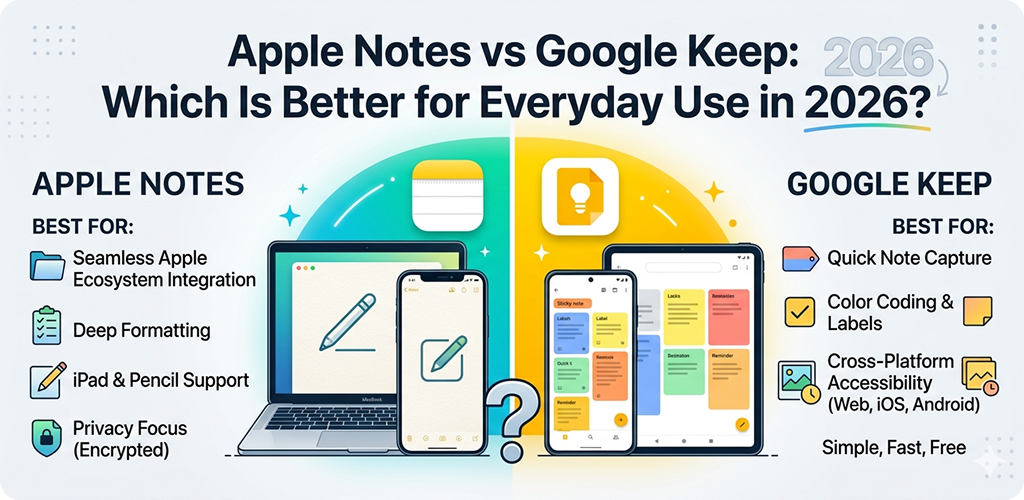
Apple Notes vs Google Keep Two note-taking apps. Both free. Both simple. But they work very differently — and choosing the wrong one can quietly slow you down every single day.
I’ve used both apps across different phones and situations. Apple Notes on an iPhone 14 during a work trip. Google Keep on a Pixel and a Samsung Galaxy for months. And honestly? The “better” app depends almost entirely on what you actually do with it.
This article breaks down both tools fairly — no brand loyalty, no fluff. Just what they’re good at, where they fall short, and which one actually fits daily life in 2026.
Apple Notes vs Google Keep Understanding What These Apps Are Actually For
Both apps let you write notes. That’s the obvious part. But they were built with slightly different goals in mind, and that difference shows up once you use them beyond the basics.
Google Keep was designed as a quick-capture tool. It’s built around speed — open it, type something, close it. The layout uses colorful cards, and everything sits on one scrollable screen. There’s no folder system. No complex organization. Just notes, labels, and search.
Apple Notes, on the other hand, leans closer to a personal document editor. You can build actual folders, format text with headers and checklists, add tables, sketch with the Apple Pencil, and lock individual notes with Face ID. It feels more like a lightweight word processor than a sticky note board.
That distinction matters a lot when picking the right one for daily use.
Apple Notes vs Google Keep Interface and Daily Feel: Which One Is Easier to Live With?
Google Keep’s Card Layout
Keep’s home screen shows all your notes as cards — like post-its stuck on a corkboard. You can switch between grid and list view. Colors help you visually separate things fast. It’s very tactile in a simple way.
For people who jot down grocery lists, random ideas, or things they need to remember before sleeping — this layout just works. No learning curve at all.
Apple Notes
Folder-based, document-style layout. Better for longer, structured notes. Clean and familiar to iOS users.
Google Keep
Card-based, colorful grid. Faster for quick capture. Better visual overview when you have many short notes.
Apple Notes’ Familiar Look
Apple Notes looks like a classic notes app — list of folders on the left (on iPad) or top-level categories on iPhone. Each note opens like a blank document. For someone who already uses Pages or Word, it feels natural immediately.
The interface got a significant update in iOS 17 and iOS 18. You now get better formatting tools, live collaboration features, and a smarter search that reads content inside scanned documents too.
Apple Notes vs Google Keep Features That Matter for Everyday Use
Checklists and Task Tracking
Both apps have checklists. Google Keep handles them well — you check an item, it moves to the bottom, and you can hide completed tasks. It’s great for shopping lists or daily to-dos.
Apple Notes has a slightly richer checklist format. You can indent sub-tasks, reorder items by dragging, and sort them manually. For someone managing a project or packing list with sub-categories, Notes handles that better.
Real example: Planning a trip to Goa? In Keep, your packing list is one flat checklist. In Notes, you can have sections — Clothes, Toiletries, Documents — each as its own indented group. Small difference, but it’s actually useful.
Reminders and Alerts
This is where Google Keep has a clear edge. You can set time-based and location-based reminders directly on a note. Walk into a specific area — like a grocery store — and the note pops up automatically. That’s genuinely handy.
Apple Notes doesn’t have built-in reminder alerts. You’d have to use the separate Reminders app and link notes manually. It works, but it’s extra steps. If you rely heavily on reminders, Keep is more practical here.
Voice Notes and Audio
Neither app does full voice recording in the traditional sense, but both let you attach audio. Apple Notes added transcription features for voice memos in recent iOS versions, which is useful during meetings or lectures.
Keep has a voice input feature that converts speech to text quickly. It’s not perfect, but for short notes — reminders, addresses, quick ideas — it works fast.
Apple Notes vs Google Keep Cross-Platform Access: The Biggest Practical Difference
Here’s where things get real for Android users specifically.
Google Keep runs natively on Android, iOS, and the web. If you switch between a Samsung phone and a Windows laptop, your notes are right there. Open keep.google.com in any browser and everything syncs perfectly.
Apple Notes is tied to the Apple ecosystem. On iPhone and Mac, it’s seamless and fast. But on Android? There’s no official app. You can access notes through iCloud.com in a mobile browser, but it’s clunky and not designed for regular use.
If you’re an Android user — or you mix Android with Windows — Google Keep wins this category without contest. Apple Notes simply wasn’t built for that workflow.
For a deeper look at how Google’s productivity tools work across devices, you can explore Google Workspace’s cross-device features — Keep is part of that same connected system.
Apple Notes vs Google Keep Privacy and Data Security
This is a topic more people are paying attention to in 2026, and fairly so.
Apple Notes supports end-to-end encryption for locked notes. Even Apple can’t read them. That’s a meaningful privacy guarantee, especially for sensitive information like passwords, personal documents, or health notes.
Google Keep is encrypted in transit and at rest, but it’s not end-to-end encrypted the way Apple Notes is. Google’s systems can technically access your notes — that’s part of how features like smart suggestions and search work. It’s not a major risk for most casual use, but it’s worth knowing.
If you’re storing anything sensitive — medical records, financial info, personal details — Apple Notes is the safer choice.
Apple Notes vs Google Keep Collaboration and Sharing
Apple Notes improved its collaboration features significantly in recent years. You can share a note or an entire folder, and multiple people can edit in real time. It sends a shareable link that works through iMessage or email. Works well within Apple devices.
Google Keep also supports collaboration — you can share a note with another Google account and both can edit it. The limitation is that it’s still card-based, so it doesn’t feel like real-time document editing the way Google Docs does.
For team collaboration or shared notes between family members, Google Keep is more accessible because it doesn’t require everyone to have an Apple device. You just need a Google account.
Search and Organization
Keep’s Label System
Google Keep uses labels instead of folders. You assign one or more labels to a note, and you can filter by label. It’s a flat structure — which is either freeing or frustrating depending on how your brain works.
Search in Keep is excellent. It searches text, labels, and even content inside images (using OCR). Type a word, and Keep pulls relevant notes fast — even if that word is inside a photo of a handwritten page.
Notes’ Folder and Smart Folder System
Apple Notes uses a traditional folder hierarchy. You can nest folders inside folders, and there are Smart Folders that auto-collect notes based on tags. It feels more like a file system — structured and organized.
Notes’ search also reads text inside scanned documents and PDFs, which has gotten noticeably better. For people who scan receipts or handwritten notes often, this is genuinely useful.
You can read more about how Apple has been improving these search and organization tools in their iOS 18 feature breakdown.
Who Should Use Which App?
Quick Verdict
Use Google Keep if: You’re on Android, you switch between devices often, you want quick capture without organization, or you rely on location-based reminders.
Use Apple Notes if: You’re fully in the Apple ecosystem, you write longer notes, you need better formatting, or you want stronger privacy for sensitive content.
There’s also a middle-ground scenario: many people use both. Keep for quick daily notes and reminders, Notes for longer writing, saved ideas, and private information. That combination actually works pretty well.
Performance and Reliability in 2026
Both apps have become very stable. Crashes are rare. Sync is generally fast on good internet connections. Keep sometimes has a tiny delay when opening on older Android phones, but it’s minor. Apple Notes on older iPhones can occasionally lag when opening large notes with many attachments.
Neither app requires a paid plan for basic use, which is one of their biggest strengths. Google Keep is completely free. Apple Notes comes with every Apple device and iCloud account at no extra charge.
Final Conclusion
After spending time with both apps across real-life situations — travel planning, class notes, grocery runs, project tracking — the honest answer is: neither app is universally better. They serve different people well.
Google Keep fits people who want something lightweight, cross-platform, and reminder-friendly. It’s one of the best quick-capture tools available right now, especially for Android users.
Apple Notes fits people who want depth — better formatting, stronger privacy, richer organization, and a seamless experience across iPhone, iPad, and Mac.
The real question isn’t which app is better. It’s which one fits how you actually think and work. Try both for a week — seriously, a week each — and one will just feel right. That’s your answer.
Related Keywords
Apple Notes vs Google Keep, best note taking app 2026, Google Keep for Android, Apple Notes features iOS 18, note taking app comparison, free note apps for mobile, Google Keep reminders, Apple Notes privacy, best app for quick notes, note app for beginners, cross-platform note taking, Apple Notes vs Keep 2026