Prakash@gmail.com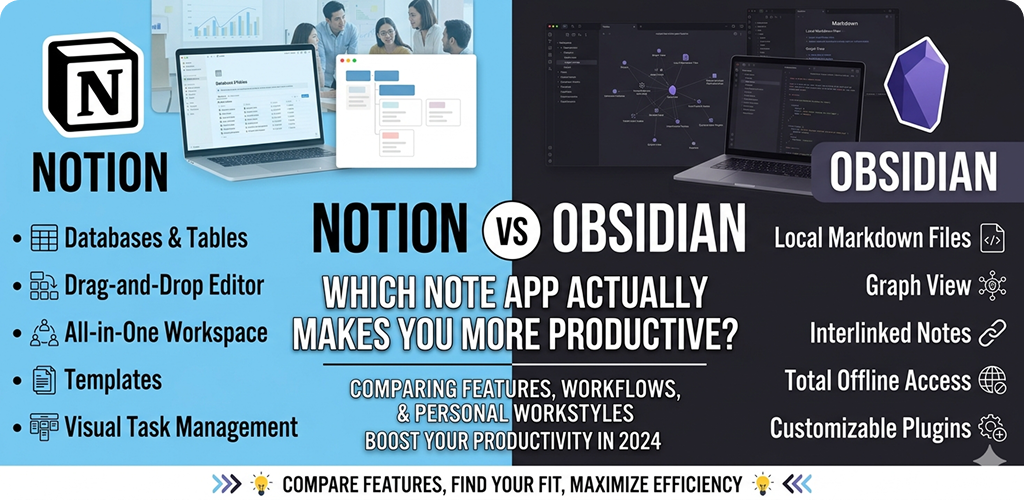
Introduction
Notion vs Obsidian This is a genuine comparison for people who are tired of switching apps every few months. Both tools have passionate users. Both have real limitations. The honest answer depends on how your mind actually works — and this article will help you figure that out.
Notion vs Obsidian The Real Question Nobody Asks First
Most comparisons between Notion and Obsidian start by listing features. But the smarter question is: what are you actually trying to do with your notes?
If you’re a student trying to organize lecture notes alongside assignments and deadlines, that’s one thing. If you’re a writer or researcher who needs to connect ideas across dozens of documents over months — that’s something completely different.
Both apps look impressive in demo videos. But in real use, they pull you in opposite directions. Notion gives you structure from the outside in. Obsidian encourages you to build structure from the inside out. Neither approach is wrong. They just serve different kinds of thinkers.
Notion vs Obsidian What Notion Actually Is (Beyond the Marketing)
Notion is a workspace that tries to be everything: notes, tasks, databases, wikis, project boards, and calendars — all in one place. For teams and anyone who manages multiple projects with lots of moving parts, this is genuinely useful.
The drag-and-drop block editor feels modern and flexible. You can create a page that has a Kanban board embedded inside it, next to a table of linked notes, next to a simple to-do list. It sounds overwhelming, but with some practice it clicks into place.
Notion works in the browser and has apps for Android, iOS, Mac, and Windows. Your data lives in Notion’s cloud, which means your notes are accessible from any device without any setup.
Notion vs Obsidian Where Notion Genuinely Shines
Notion is excellent when you need to organize information that has relationships — like a content calendar where each post links to a brief, which links to a project, which links to a deadline. That kind of structured thinking is Notion’s home territory.
For collaborative work it’s probably the best option in this category. You can share any page, assign comments, and multiple people can edit simultaneously. If you’re managing a small team or running a shared knowledge base, Notion handles this better than Obsidian does out of the box.
Notion’s Honest Limitations
The app can get slow. On Android especially, loading a complex page with embedded databases takes a noticeable few seconds. On a budget Android device, this friction adds up quickly and becomes a real annoyance.
Notion’s free plan is usable, but some features are locked behind a paid tier. And perhaps most importantly — your data is stored in Notion’s proprietary format on their servers. If the company changes its pricing or shuts down, accessing your notes becomes complicated.
Notion vs Obsidian What Obsidian Actually Is
Obsidian is a local-first Markdown editor that specializes in linking notes together. Instead of working like a traditional notebook, it encourages you to think in connections — each note can link to other notes, and you can visualize those connections as a graph.
Your notes are stored as plain .md files on your device. You own them completely. Open them with any text editor even if Obsidian disappears tomorrow. This is a fundamentally different philosophy from Notion.
There’s a strong community around Obsidian that has built hundreds of plugins — things like a daily journal template, Pomodoro timers, a kanban board plugin, LaTeX support for math equations, and much more. You can build almost any workflow you want, but you have to build it yourself.
The Graph View — Genuinely Useful or Just Pretty?
One of Obsidian’s most talked-about features is the graph view, which shows your notes as nodes with lines connecting them. When you first see it, it looks fascinating. But is it actually useful?
Honestly — it depends. For writers, researchers, or anyone building a “second brain” over months and years, the graph becomes a real tool for discovering unexpected connections between ideas. For someone who just needs to take clean, fast notes, it’s more visual candy than practical help.
The Sync Problem on Android
Obsidian on Android works well, but syncing your notes across devices isn’t free. The official Obsidian Sync service costs money. Alternatives like using a third-party sync method via cloud storage work but require some technical comfort. This is worth knowing before you commit to Obsidian on mobile.
Notion vs Obsidian Side-by-Side: The Honest Comparison
| Feature | Notion | Obsidian |
|---|---|---|
| Data ownership | Stored on Notion’s servers | Local files on your device — you own them |
| Android performance | Can lag on complex pages | Fast and lightweight |
| Collaboration | Built-in, easy to share | Limited without extra plugins or paid sync |
| Learning curve | Moderate — intuitive but deep | Steeper — requires setup investment |
| Free tier | Functional with some limits | Fully free for personal use, local only |
| Offline access | Partial — limited without internet | Full offline access always |
| Customization | Moderate, within Notion’s system | Extremely high via community plugins |
| Best for | Project management, teams, databases | Personal knowledge, long-form thinking, writing |
Productivity: Which One Actually Delivers?
Here’s where things get personal, and honestly, a little uncomfortable. Both apps can make you more productive. Both can also become elaborate procrastination tools where you spend more time organizing your notes than actually using them.
Notion’s productivity risk is template addiction. There are thousands of free Notion templates online, and it’s very easy to spend an entire Sunday afternoon redesigning your workspace instead of doing actual work. The app rewards elaborate setup, which can feel productive without being productive.
Obsidian’s productivity risk is plugin rabbit holes. Because it’s so customizable, you can endlessly tweak your setup — trying new themes, installing another plugin, refining your folder structure. Again, feels like work. Often isn’t.
The User Who Does Better in Notion
You’ll likely get more done in Notion if you work on projects with clear phases and deliverables. Students managing coursework, freelancers tracking client projects, or anyone running a content pipeline will find Notion’s database features genuinely useful on a day-to-day basis.
The all-in-one nature helps too. Instead of switching between a notes app, a task manager, and a calendar, you can keep things in one workspace. Less context-switching is real productivity gain.
The User Who Does Better in Obsidian
If your work involves deep reading, research, writing long documents, or connecting complex ideas over time — Obsidian is the better tool for your brain. Journalists, academics, fiction writers, and knowledge workers who need to build on their own past thinking will find the linking system invaluable.
The local-first approach also removes one mental friction point: you never wonder whether your notes synced or worry about what happens if the service goes down. They’re just files on your phone or laptop, always there.
💡 Practical Tip
Try this before committing to either app: write down the last three things you needed to look up in your old notes. Were they project tasks, ideas, research snippets, or meeting notes? Your answer will tell you more about which app fits your life than any comparison article can.
Notion vs Obsidian The “Second Brain” Idea — And Why It Matters Here
The concept of building a personal knowledge management system has become popular in productivity circles. The idea is that instead of keeping information scattered across browser bookmarks, random notes, and your memory, you build one organized system where everything connects.
Obsidian was practically built for this philosophy. Its linking model, combined with the graph view and backlinks, makes it much easier to develop a genuine second brain over time.
Notion can serve a similar purpose but it tends to work better as an action-oriented workspace than a knowledge-building one. Notes in Notion are often tied to a project or task. Notes in Obsidian are more often tied to an idea or a concept. That’s a subtle but meaningful difference in how you end up thinking.
Notion vs Obsidian The Middle Path: Using Both
Some people use both — and it’s not as messy as it sounds. A common setup is Notion for project management and team collaboration, and Obsidian for personal reading notes, writing drafts, and long-term knowledge building.
This does mean maintaining two systems, which has its own overhead. But if your work naturally splits into “things I’m doing with others” and “things I’m thinking about alone,” the split can actually reduce friction rather than add it.
On Android, both apps are available and reasonably functional. Notion feels more polished as a mobile app. Obsidian on Android is solid but feels more like a desktop app that was adapted for mobile — which, to be fair, it kind of is.
Notion vs Obsidian A Note on Long-Term Commitment
Whichever app you choose, the productivity gains come from staying with it long enough to build real habits. Both Notion and Obsidian require a few weeks of regular use before they start feeling natural.
The worst outcome is switching every time you see someone else’s impressive setup on YouTube. A modest, consistent system in either app will outperform a perfect system you keep redesigning.
Pick based on your actual workflow, not someone else’s aesthetic. Set it up simply. Use it for 30 days before changing anything significant. That alone will do more for your productivity than any feature comparison.
If you want a deeper look at building sustainable note-taking habits, Obsidian’s official blog has some genuinely thoughtful writing on how people use the tool in real life — not just feature announcements.
Final Conclusion
After everything, this isn’t really a competition. Notion and Obsidian are designed with different people in mind, and choosing between them is less about which is “better” and more about which one fits the way you actually think and work.
Notion works well when your productivity is project-driven — when you need databases, team access, and a clear structure for getting things done. It’s connected, collaborative, and visual in a way that makes complex projects manageable.
Obsidian works well when your productivity is knowledge-driven — when you need to think deeply, connect ideas, and build understanding over months. Its local-first approach and linking system reward patience and depth.
If you’re still unsure, start with Notion. It has a lower barrier to entry and you’ll get useful results faster. Once you’ve outgrown it — or found that it doesn’t quite match how your brain works — Obsidian will be waiting, and you’ll know exactly why you’re switching.
The best note-taking app is always the one you’ll actually open tomorrow.