Prakash@gmail.com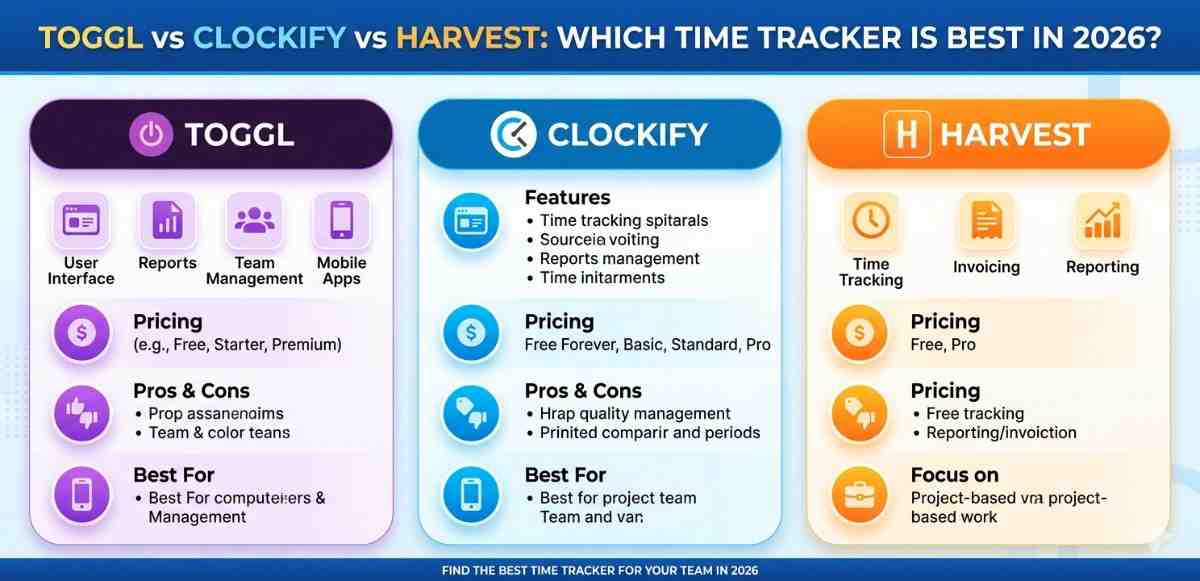
Introduction
Toggl vs Clockify Time tracking sounds like a simple thing. You start a timer, stop it, and see where your hours went. But once you actually sit down and try a few tools, you realize they’re all quite different in terms of feel, features, and what they’re really designed for.
I’ve personally used all three of these tools at different points — as a freelancer, as part of a small team, and just for personal productivity. So this isn’t a feature-by-feature spreadsheet rundown. It’s a real look at how these tools behave in practice, and which one might actually suit your situation in 2026.
Toggl vs Clockify What Are These Tools and Why Do People Use Them?
Before we compare them, it helps to understand what each one is trying to do.
Toggl vs Clockify is built around simplicity. The whole idea is that tracking time shouldn’t take more than a few seconds. You click, you work, you stop. It’s one of the most popular tools for freelancers and individuals who just want a clean interface.
Clockify takes a different approach — it’s extremely generous with its free plan and aims to be a complete time tracking platform for teams of any size. It has a lot of features packed in, which is great but can also feel overwhelming at first.
Harvest leans heavily into invoicing and billing. It’s a solid choice for agencies and client-based businesses where tracking hours is directly connected to getting paid.
Interface and Ease of Use
Toggl vs Clockify Track
Toggl’s interface is honestly one of the cleanest in this space. You get a large timer button, a search bar for recent tasks, and a simple list of logged entries. Nothing feels cluttered.
Setting up a project takes maybe a minute. You can also use keyboard shortcuts and browser extensions to start tracking without even opening the app. For people who forget to log time mid-work, Toggl has a feature that nudges you if you’ve been active without a running timer.
The mobile app on Android mirrors the desktop experience well. I never had moments where I felt lost or unsure where something was.
Clockify
Clockify’s interface has gotten better over the years, but it still has a steeper learning curve compared to Toggl. There are more tabs, more settings, and more things to configure before it feels personalized.
Once you’re used to it, it works really smoothly. The weekly calendar view is particularly useful — you can see blocks of time across your whole week in a visual grid, which is great for spotting wasted hours.
On mobile, Clockify functions well, though sometimes the sync between devices takes a few extra seconds. Not a dealbreaker, but worth knowing.
Harvest
Harvest’s design is refined and professional. It feels like a tool made for client work — because it is. The UI is simple, but it’s simple in a “less features, more focus” kind of way.
What’s nice is that timesheets in Harvest are laid out in a clean weekly grid per project. So if you work on multiple clients daily, you can see everything lined up without bouncing between sections.
Toggl vs Clockify Features Breakdown
Reporting
Toggl Track has surprisingly good reporting for a tool that emphasizes simplicity. You can filter reports by project, client, tag, or team member. The visual graphs are easy to read, and you can export data in CSV or PDF format.
Clockify’s reports are more detailed. You can generate reports by billable hours, cost, estimate vs actual time — it gets quite granular. For teams that need to account for every hour in detail, this depth is genuinely useful.
Harvest also has solid reporting, but what sets it apart is how tightly the reports are tied to invoices. You can literally see how much revenue a project is generating based on hours tracked.
Toggl vs Clockify Project and Client Management
All three tools let you create projects and assign clients. But there are differences in how much control you get.
Toggl lets you set hourly rates per project and per team member, which is helpful for calculating costs. Clockify adds project estimates — you can set a budget in hours or money and get alerts when you’re nearing the limit. Harvest goes one step further by connecting projects directly to its invoicing system.
If you work with multiple clients and need to send invoices based on tracked time, Harvest is genuinely ahead here. It’s not even close.
Invoicing
Toggl Track dropped native invoicing a while back and now integrates with tools like FreshBooks and QuickBooks instead. So if invoicing matters to you, you’re relying on third-party connections.
Clockify has basic invoicing built in, especially on paid plans. It covers the essentials — client details, itemized hours, totals — but it’s not a replacement for a dedicated invoicing tool.
Harvest’s invoicing is the real deal. You can create invoices directly from tracked time, customize them, send reminders for unpaid invoices, and even accept online payments. For freelancers and agencies that bill by the hour, this alone might be the deciding factor.
Toggl vs Clockify Pricing in 2026
This is where things get interesting.
Toggl Track offers a free plan for up to 5 users, and paid plans start around $10 per user per month. The Starter plan adds billable rates and project estimates. The Premium tier unlocks more advanced features like profit analysis.
Clockify is the most generous here. The core time tracking features are free — unlimited users, unlimited projects, unlimited time entries. You pay for extras like advanced scheduling, invoicing, or GPS tracking. For small teams with tight budgets, Clockify is hard to ignore.
Harvest is priced per seat and doesn’t have a free tier beyond a limited trial. It’s roughly $12 per user per month. That adds up quickly for larger teams. But if you’re using it as your invoicing tool as well, you might actually be saving money by not needing a separate billing tool.
Toggl vs Clockify Which One Is Best for Different Users?
Best for Solo Freelancers
Toggl Track. The simplicity, the clean interface, and the browser extension make it the easiest to actually stick with. You won’t overthink it. Just track your time and move on.
If you also need to invoice clients, then Harvest becomes a serious contender — even with the price.
Best for Small Teams on a Budget
Clockify. The free plan is generous enough for most small teams. You get project tracking, reports, and a decent mobile app without spending anything. When you scale, the paid plans are reasonable.
Best for Agencies and Client-Based Businesses
Harvest. The invoicing workflow alone makes it worth the cost. If your business model is billing clients for time, having everything — tracking, reports, invoices — in one place saves real hours every week.
Integrations and Android App Experience
All three tools integrate with popular apps like Asana, Trello, Slack, and Google Calendar. Toggl and Clockify have browser extensions that work well for web-based workflows.
On Android specifically, Toggl and Clockify both have well-maintained apps. Harvest’s Android app is functional but slightly less polished than the other two. If you’re primarily working from your phone, Toggl’s app is the smoothest experience.
For more insights on productivity tools that work seamlessly across Android devices, you might want to check out best Android productivity apps for remote workers or explore how to manage freelance workflows on Android for real-world tips.
What’s Changed in 2026?
Clockify added better AI-assisted time suggestions this year — it can detect what you’ve been working on and suggest time entries automatically. Toggl improved its mobile widget so you can start and stop timers directly from your Android home screen. Harvest added multi-currency invoicing, which is useful if you work with international clients.
None of these are revolutionary updates, but they show that all three tools are still being actively developed and improved.
Final Conclusion
After going through all of this, the honest answer is: there’s no single winner for everyone.
Toggl Track wins on simplicity and ease of use — it’s the tool you’ll actually keep using because it never gets in your way. Clockify wins on value — particularly for teams that need a lot of features without a big budget. Harvest wins on the invoicing and billing side — for client work, it connects the dots in a way the others don’t.
Pick based on your actual workflow. If you mostly need to log hours and see where time goes, Toggl is enough. If you’re managing a team and cost is a concern, start with Clockify. If getting paid faster and cleaner is the goal, Harvest is worth every penny.