Prakash@gmail.com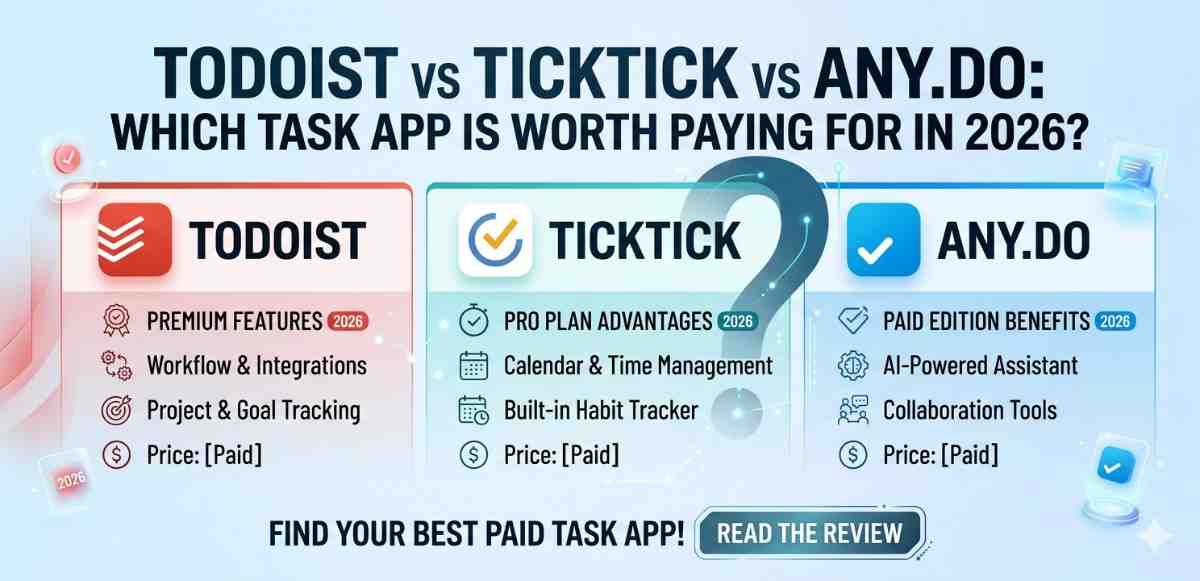
Todoist vs TickTick vs Any.do Picking a task management app feels simple until you’re actually staring at three subscription pages wondering where your money is going. I’ve spent time with all three of these apps — Todoist, TickTick, and Any.do — across different Android phones, and honestly? Each one has its own personality. Let me break it down in a way that actually helps.
Todoist vs TickTick vs Any.do Why Task Apps Even Matter in 2026
We’re all dealing with more than we used to. Work tasks, personal reminders, grocery lists, project deadlines — they pile up fast. A good task app on your Android phone becomes like a second brain. But a bad one? You end up ignoring it within a week and going back to sticky notes.
The real question isn’t which app looks the prettiest. It’s which one fits how you think, and whether it’s worth paying for the premium version.
Todoist vs TickTick vs Any.do Todoist: The Power User’s Comfort Zone
What Todoist Does Really Well
Todoist has been around long enough to get a lot of things right. The natural language input is one of those things. You type something like “Call dentist every Tuesday at 10am” and Todoist just… gets it. No extra steps. On Android, this works smoothly through the quick-add widget on your home screen.
The project organization is also genuinely good. You can nest tasks inside projects, add sections, assign priority levels, and even add labels. If you’re someone managing multiple areas of your life — work, side projects, home stuff — Todoist handles that layering without becoming confusing.
Todoist vs TickTick vs Any.do Where the Free Plan Starts Hurting
Here’s the thing about Todoist’s free tier: it’s usable, but you’ll hit walls. No reminders. Limited filters. No calendar view. If you’re using it purely as a to-do list with no time-based reminders, fine. But most people need reminders. That’s kind of the whole point.
The Pro plan (around $4/month billed annually) unlocks reminders, filters, calendar view, and productivity tracking. The productivity stats feature, called Karma, is either motivating or annoying depending on your personality. Some people love the streak system. Others find it a bit gamey.
Todoist vs TickTick vs Any.do Todoist on Android: A Smooth Experience
The Android app is well-designed. The widget options are flexible, the quick-add shortcut works reliably, and the app doesn’t drain your battery unnecessarily. If you use Gmail or Google Calendar heavily, Todoist’s integration with those services works without much setup.
TickTick: The Most Complete Package Out of the Box
TickTick Packs Everything In
TickTick might be the most feature-rich of the three. Built-in Pomodoro timer, habit tracker, calendar view, multiple time zones support, Eisenhower Matrix (a way to sort tasks by urgency and importance), and a pretty solid widget system for Android home screens. It’s a lot.
What’s interesting is that the free version of TickTick is noticeably more generous than Todoist’s. You get basic reminders, calendar view, and the Pomodoro timer without paying anything. For someone just starting out, that’s a significant advantage.
Todoist vs TickTick vs Any.do The Premium Features Are Genuinely Useful
TickTick Premium (roughly $2.79/month annually) adds things like calendar subscription syncing, customizable smart lists, custom filters, and timeline view. The calendar sync works well on Android — you can view your Google Calendar events alongside your tasks in one place without switching apps constantly.
The habit tracker, even in the free version, is a nice bonus. If you’re trying to build routines alongside managing tasks, having both in one place reduces the number of apps cluttering your phone.
Todoist vs TickTick vs Any.do A Few Small Complaints
The interface can feel slightly overwhelming at first. There’s a lot going on. If you prefer clean and minimal, TickTick might feel like walking into a hardware store and not knowing which aisle has what you need. Give it a few days though — it starts making sense.
Some users also report occasional sync issues when switching between Android and desktop, though this seems to depend on your Google account settings more than the app itself.
Any.do: Built for People Who Like Simplicity
The Philosophy Behind Any.do
Any.do takes a different approach. It wants to be the least complicated option in the room. The interface is clean, the onboarding is quick, and adding a task takes about two seconds. For someone who finds Todoist or TickTick overwhelming, Any.do feels like a relief.
The “Plan My Day” feature is unique. Each morning, the app nudges you to review your tasks and plan what you’ll actually do today. It’s a small thing but genuinely helpful for people who collect tasks without ever reviewing them — which is most of us, honestly.
Any.do Premium: Worth It?
This is where it gets a little complicated. Any.do Premium costs around $5/month or $36/year, which actually makes it more expensive than both Todoist and TickTick on an annual basis. What do you get? Recurring tasks, color tags, custom recurring dates, location-based reminders, and WhatsApp reminders (interesting, but niche).
The location-based reminders work well on Android — you can set a task to remind you when you arrive at a specific place, like “Buy milk” triggering when you’re near the grocery store. That feature alone can be genuinely useful for some people.
But compared to what TickTick offers at a lower price, Any.do Premium feels a bit thin. You’re paying for simplicity, essentially. Some people are absolutely fine with that trade.
Any.do and Android Integration
Any.do connects with Google Assistant decently well. You can add tasks by asking Google Assistant out loud, which shows up in your Any.do list. For people who use voice commands frequently, this is a practical advantage.
Direct Comparison: What Actually Matters
Free Plan Generosity
TickTick wins here without much debate. It gives you actual reminders, a calendar view, and a habit tracker before you spend a single rupee. Todoist’s free tier is surprisingly limited, and Any.do sits somewhere in the middle.
Interface Simplicity
Any.do is the easiest to start using immediately. TickTick has the steepest learning curve. Todoist falls in between — clean but with enough depth that beginners might initially feel lost.
Value for Money
If you’re going to pay, TickTick offers the most features per rupee. Todoist is slightly pricier but has a more polished ecosystem and better third-party integrations. Any.do charges the most for arguably the least features — but charges for the experience of simplicity, which isn’t nothing.
Long-Term Reliability
All three apps have been around for years and have solid track records. Todoist is backed by Doist, a company that’s been stable and focused on this one product for over a decade. TickTick is owned by a larger company but has remained consistent in updates. Any.do has been around since 2011 and continues to receive regular updates.
Which One Should You Actually Pay For?
Here’s how I’d frame it based on what kind of person you are:
If you manage complex projects with many moving parts and want reliable integrations with tools like Slack, Gmail, or Notion — go with Todoist. The Pro plan is worth the cost if you’re a power user.
If you want the most features for the least money, especially if you’re also trying to build habits or use the Pomodoro technique — TickTick Premium is hard to beat. It’s practical, flexible, and regularly updated.
If you just want a clean, fast, stress-free task app and don’t need dozens of features — Any.do works. But consider whether the premium price makes sense compared to TickTick.
For most Android users who are just getting into task management, starting with TickTick’s free plan is a reasonable move. You can try a good set of features without committing money upfront.
Final Conclusion
Choosing between Todoist, TickTick, and Any.do in 2026 really comes down to three things: how complex your needs are, how much simplicity you value, and what you’re comfortable paying each month.
TickTick offers the most generous free tier and the most feature-packed premium plan at the lowest price point. Todoist wins on third-party integrations and long-term reliability for people managing deep, layered projects. Any.do suits people who want clarity over complexity, even if it costs a bit more for fewer features.
None of these apps are a waste of time. They’re all genuinely useful when matched to the right person. Take a week with the free version of whichever catches your interest, and let your own usage patterns tell you whether upgrading makes sense.