Prakash@gmail.com
Introduction
Focus Apps for Living with ADHD and trying to stay productive on a phone — or a computer — can feel like you’re swimming upstream every single day. You open an app to do one thing, and somehow thirty minutes later you’re watching unboxing videos and the original task is forgotten entirely. It’s not a willpower problem. It’s a brain structure thing, and most productivity apps are honestly not built with that in mind.
But 2026 has brought some genuinely useful tools. Not perfect ones, but tools that actually understand how ADHD brains work — with things like body doubling, visual timers, distraction blocking, and task chunking built in from the ground up. This article walks you through the best ones, explains what makes them worth trying, and gives you an honest look at who each one works best for.
Focus Apps for Why Most Generic Productivity Apps Don’t Work for ADHD
Before jumping to app names, it’s worth understanding the problem. Standard to-do list apps assume you’ll remember to open them, feel motivated to check tasks off, and can naturally prioritize what to do first. For most people with ADHD, that’s three assumptions that fall apart before breakfast.
What ADHD brains often need is visual urgency, short feedback loops, and something that reduces the gap between intention and action. When an app asks you to type in tasks, organize them by project, and assign due dates — that’s already too many steps. You’ve lost the thread before you even started.
The best ADHD focus apps are ones you barely have to think about opening. They integrate into your phone’s normal usage patterns and nudge you forward without creating more mental overhead.
Apps built specifically with ADHD in mind tend to be simpler on the surface, more visual, and forgiving about failure. They don’t punish you for forgetting — they just help you restart. That’s a meaningful difference.
Focus Apps for Top Focus Apps for ADHD Worth Using in 2026
1. Focusmate — Virtual Body Doubling Done Right
Pairs you with a real person over video for 25–75 minute work sessions. You both state your goal at the start, work silently, and check in at the end. Surprisingly effective for ADHD users who need external accountability to stay on task.
Body doubling is a well-known ADHD strategy where having another person present — even silently — helps you stay focused. Focusmate digitizes this without requiring any social energy. You don’t have to talk. You just show up, say what you’re working on, and work.
If you’ve ever noticed you concentrate better in a café or library than at home alone, this is why. Focusmate replicates that environment on demand. The mobile version works fine, though most users prefer desktop for actual work sessions.
2. Focus Apps for Tiimo — Built Specifically for Neurodivergent Brains
A visual daily planner with icons, color blocks, and a circular timeline. Designed by and for neurodivergent users, it makes your day feel concrete and manageable rather than abstract and overwhelming.
Most planners show you a text list of tasks. Tiimo shows you a visual arc of your day — you can see how long each block is, what’s coming next, and how much time you have left before something starts. That visual representation hits differently when you struggle with time blindness, which is a real and common ADHD experience.
You can set recurring routines, get gentle reminders, and add small visual cues to each task. It’s designed to reduce cognitive load rather than add to it. The learning curve is low, which matters when “figuring out a new app” is itself a barrier. For people also looking to understand how Android notification settings affect focus, pairing Tiimo with good notification management can make a real difference.
3. Focus Apps for Forest — Simple, Visual, and Oddly Motivating
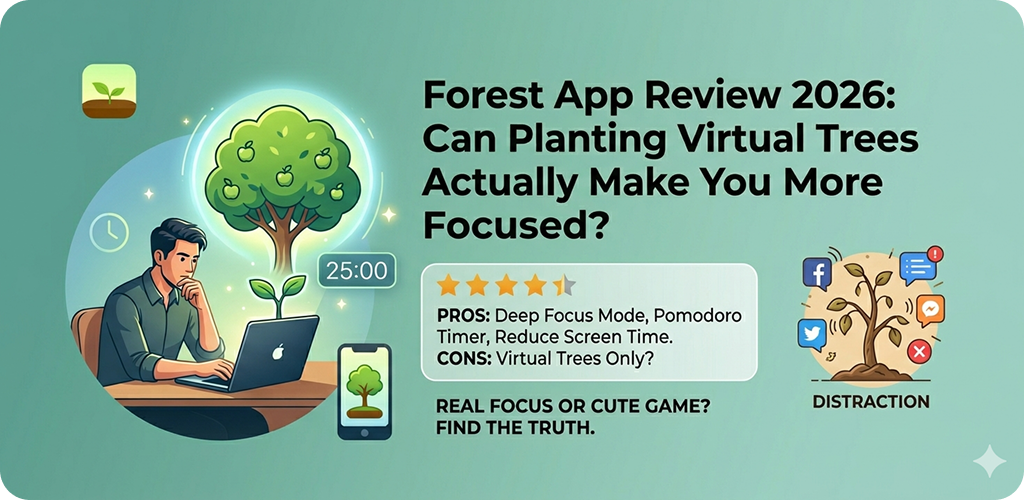
You plant a virtual tree that grows while you stay off your phone. Leave the app and the tree dies. Over time you grow an entire forest. There’s even a feature to plant real trees through a partnership program.
It sounds simple — maybe too simple. But for ADHD users, the visual reward of watching something grow works better than abstract point systems. The stakes feel concrete even if they’re small. Knowing your tree will die if you open Instagram is weirdly effective as a deterrent.
Forest is best for people who need to stay off their phone during focused work, not necessarily for organizing tasks. It’s a companion tool more than a full productivity system.
4. Focus Apps for TickTick with Pomodoro Timer — Structured Without Being Rigid
A task manager that has a built-in Pomodoro timer, habit tracker, and calendar view. More flexible than most competitors, and the timer integration means you can go straight from task to timed work without switching apps.
The Pomodoro technique — 25 minutes of focused work, 5 minute break, repeat — is one of the most consistently recommended strategies for ADHD. Short sprints with defined endpoints work well because they give your brain a visible finish line. Most people with ADHD can push through almost anything if they know it ends in 25 minutes.
TickTick’s Android app is well-optimized. Tasks sync smoothly, widgets work reliably on the home screen (which matters for ADHD — out of sight really is out of mind), and the interface doesn’t overwhelm you with options. You can keep it as simple or as detailed as your brain needs on any given day.
5. Opal — Distraction Blocking That Actually Sticks
A focused distraction-blocking app with deep app blocking, session scheduling, and a “deep focus” mode that makes breaking the block intentionally difficult enough to pause before giving in to impulse.
App blockers only work if they create enough friction to interrupt the automatic habit loop. Opal adds that friction thoughtfully — it’s not just “this app is blocked,” it’s a brief pause, a prompt asking if you really want to override, and a visual reminder of what you were trying to do instead. That pause is often enough to redirect.
On Android, Opal works through the Digital Wellbeing API. It’s worth checking your Android version compatibility, and pairing it with Android’s built-in Focus Mode gives you an extra layer of control. Understanding how to set up Android Focus Mode for ADHD-friendly phone use can help you build a system that supports these apps properly.
Focus Apps for What to Look for When Choosing an ADHD Focus App
Not every app on this list will work for every person. ADHD presents differently — some people hyperfocus easily but can’t transition between tasks. Others struggle to start anything at all. Some need visual structure; others need silence and simplicity.
- If you struggle to start tasks, try Focusmate or Forest first — external accountability helps more than organization systems when initiation is the problem.
- If time blindness is your main challenge, Tiimo’s visual clock layout is directly designed for that specific experience.
- If you keep getting pulled into your phone mid-task, Opal and Forest together give you two layers of friction against that habit.
- If you need a full productivity system, TickTick with Pomodoro is the most complete single-app solution on Android.
- Give every new app at least two weeks. ADHD brains often reject new systems initially — novelty wears off fast, and real benefit shows up in week two or three.
Android-Specific Tips for Getting More Out of These Apps
Most of these apps have Android-specific features worth knowing. Home screen widgets are critical — if an app has a widget, use it. An ADHD brain will not open an app buried in a folder. It needs to be right there, visible, one tap away.
Notification behavior also matters more than people realize. Too many notifications from too many apps creates the opposite of focus. Go into your Android settings and turn off non-essential notifications for every app except the focus tools you’re actively using. One clear, useful notification is worth fifty ignored ones.
Also worth checking: battery optimization settings. Android sometimes aggressively kills background apps to save power, which can break timers or notification reminders from apps like TickTick and Tiimo. You may need to exclude these apps from battery optimization in Settings → Battery → Battery Optimization to make sure reminders actually fire when they should. This is a common Android quirk that trips people up, and there’s a broader explanation in our guide on fixing Android apps that stop working in the background.
Focus Apps for Combining Apps Into a Simple System
One app rarely covers everything. A practical starting stack for ADHD on Android might look like: Tiimo for daily visual planning, TickTick for capturing tasks when they come to mind, and Opal blocking social media during your work blocks. Forest as an optional layer if you need extra phone-off reinforcement.
Keep it to two or three apps maximum. More than that and app-switching itself becomes a distraction. The goal is less friction, not more tools.
Final Conclusion
ADHD is not a productivity failure — it’s a neurological difference that requires different tools. The apps covered here aren’t magic, but they are meaningfully better designed for how ADHD brains actually operate: visual, forgiving, low-friction, and built around real accountability.
Start with one app, not all five. Give it time. Adjust your Android settings to support it properly. And remember that even an imperfect system you actually use beats a perfect one you abandoned after day three. The right tool is the one that gets out of your way and helps you get things done — even on the hard days.