
 Prakash@gmail.com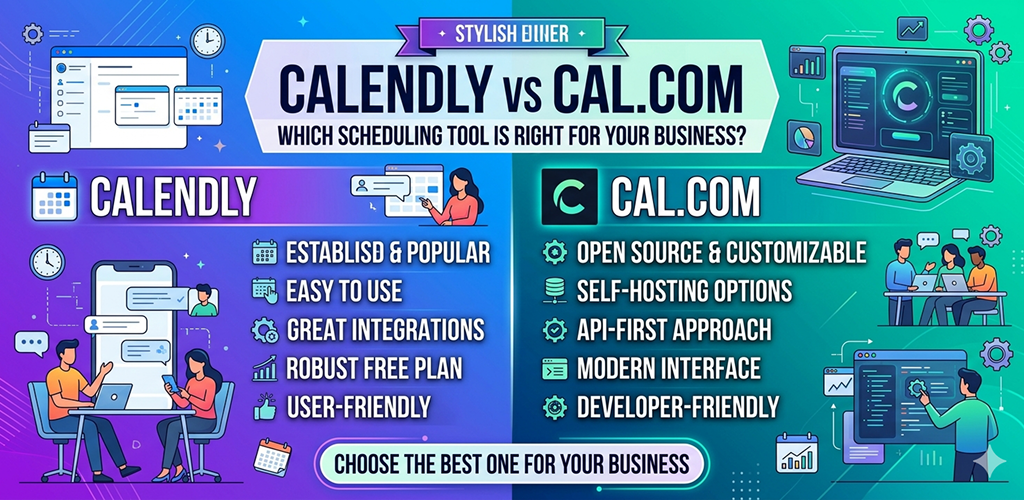
Introduction
Calendly vs Cal.com Choosing a scheduling tool sounds like a small decision. But if you’ve ever spent twenty minutes going back and forth in emails just to set up a thirty-minute call, you already know how much the right tool matters. Two names that come up again and again are Calendly and Cal.com. Both do the same core job — help people book time with you without the email chaos. But they’re built differently, priced differently, and honestly, they suit different kinds of people.
Let me walk you through both, without the fluff.
Calendly vs Cal.com What Is Calendly and Who Actually Uses It?
Calendly has been around since 2013, and by now it’s practically the default when someone says “just send me your scheduling link.” It’s a cloud-based tool that connects to your calendar, shows your available slots, and lets people book directly. No back-and-forth needed.
It works really well for freelancers, sales teams, consultants, and small businesses. The interface is clean and polished. Setting up your first event type takes maybe ten minutes if you’ve never used anything like it before.
Calendly vs Cal.com What Makes Calendly Comfortable to Use
The onboarding is almost too easy. You sign up, connect your Google or Outlook calendar, set your availability, and you’re done. Your booking page is live. You share the link and people start booking.
Calendly also handles time zones automatically, which sounds small but saves genuine headaches. If someone in London is booking a slot with you in Mumbai, the tool adjusts for both of you without you doing anything.
Integrations are solid too — Zoom, Google Meet, Stripe for payments, HubSpot, Salesforce. For most business workflows, Calendly fits in without friction.
Calendly vs Cal.com What Is Cal.com and Why Are People Switching to It?
Cal.com is newer and it came at Calendly from a completely different angle. It launched as an open-source scheduling platform, which means the actual code is publicly available. Anyone can look at it, audit it, or even host it themselves on their own servers.
That one fact changes everything about who finds Cal.com attractive.
Developers, privacy-conscious businesses, and teams that want full control over their data tend to gravitate here. But even if you’re not technical, Cal.com has a hosted version that works just like any other SaaS product — you sign up, set up, share your link.
The Open-Source Advantage
Most people won’t self-host Cal.com. That’s fine. But the fact that you can is meaningful. It means no vendor lock-in. If the company ever shuts down or changes its pricing dramatically, you’re not stuck. Your data, your system.
For businesses in sectors like healthcare, legal, or finance — where data handling has strict requirements — being able to run scheduling infrastructure on your own servers is genuinely valuable.
Cal.com also moves fast. Because it’s open-source, contributors from around the world add features regularly. The product has grown quickly since launch.
Calendly vs Cal.com Pricing: Where Things Get Interesting
This is honestly one of the biggest differences between the two.
Calendly offers a free plan, but it’s limited to one active event type. If you need more — like different meeting durations, team scheduling, or payment collection — you’re looking at their paid plans, which start around $10–$12 per user per month and go up from there for teams.
Cal.com’s hosted version has a generous free tier that includes unlimited event types. Their paid plans start lower than Calendly’s and include features that Calendly charges more for. If you’re self-hosting, the software itself is free — you just pay for your own server.
For solo creators or small teams watching budgets, Cal.com’s pricing structure is noticeably friendlier.
Calendly vs Cal.com Feature Comparison: Going Deeper Than the Surface
Both tools cover the basics well. Let’s look at where they actually differ.
Customization and Branding
Calendly allows some customization — colors, logo, profile info. But the booking page still looks like Calendly. On paid plans you can remove their branding, but that costs extra.
Cal.com gives more control here. The UI is more flexible, and because it’s open-source, technically you can modify the whole look if you have a developer. Even without that, the default customization options feel less restricted.
Team Scheduling Features
Calendly has strong team features — round-robin booking, collective scheduling, team pages. These work well and are relatively easy to configure. But you need a team plan to access most of them.
Cal.com also supports team scheduling and has been adding collective and round-robin options. It’s catching up, and for smaller teams, the current feature set is usually enough.
Workflow Automations
Calendly has a built-in “Workflows” feature that lets you set up automatic reminders, follow-up emails, and SMS messages based on booking events. It’s useful and well-designed.
Cal.com has similar automation capabilities and connects with tools like Zapier and Make for more advanced workflows. If you’re already using those tools, it fits in naturally.
Routing Forms
Calendly introduced routing forms — essentially, a set of questions that directs someone to the right team member or meeting type based on their answers. It’s useful for businesses with multiple departments or service offerings.
Cal.com has this too now, called “Routing Forms.” It works similarly. Calendly’s version is slightly more polished at the moment, but Cal.com is closing the gap.
Calendly vs Cal.com Privacy and Data Ownership
This is a section most comparison articles skip over, but it matters more than people realize.
With Calendly, your booking data lives on their servers. Their privacy policy governs what happens to it. For many businesses, that’s perfectly fine. But if you’re in a regulated industry or your clients are particularly sensitive about data, it’s worth thinking about.
Cal.com, especially the self-hosted version, flips that completely. Your data stays where you put it. No third party involved. Even the cloud version emphasizes transparency in how data is handled.
If data sovereignty is something your business cares about — or your clients ask about — Cal.com has a clear answer. Calendly doesn’t, at least not in the same way.
Calendly vs Cal.com Which One Should You Actually Choose?
Here’s how I’d break it down practically.
Go with Calendly if: You want something that works immediately with zero technical involvement. Your team is already using Salesforce or HubSpot and needs deep CRM integration. You need highly polished team scheduling that just works without configuration effort.
Go with Cal.com if: You want a more generous free plan. You care about open-source software or data privacy. You’re a developer or work with one who can customize the setup. You want to avoid vendor lock-in.
Neither tool is objectively better. It really comes down to what your business actually needs and how much those differences matter in your day-to-day workflow.
A Note on Switching Costs
Whichever you pick, switching later isn’t catastrophic — but it does take time. You’ll need to update your booking links everywhere you’ve shared them, reconfigure your integrations, and rebuild your event types. It’s manageable, but not instant.
So it’s worth spending an hour testing both before committing. Both have free plans. Create a test event, share the link with a colleague, go through the whole booking experience from their side. That tells you more than any comparison article can.
Final Conclusion
Calendly and Cal.com are both genuinely good tools — just built with different priorities. Calendly is polished, easy, and reliable, with a long track record and strong integrations. It’s the safe, comfortable choice for most small to mid-sized businesses. Cal.com brings something different: openness, flexibility, better pricing on the free tier, and the option to own your own infrastructure. It’s growing fast and already strong enough for most use cases.
If you’re just starting out and want something working today with no friction, Calendly gets you there faster. If you’re thinking longer-term about data control, cost, or wanting a tool that grows with you on your own terms, Cal.com is worth the extra hour of setup.
There’s no universally right answer — just the one that fits your situation.


Good
Good and moust trust game