Prakash@gmail.com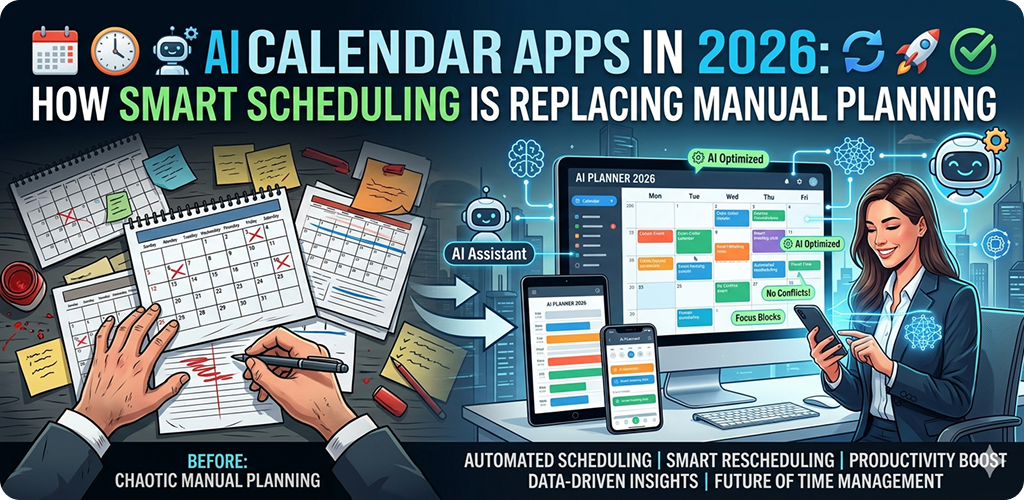
There’s a moment most people have experienced — staring at a blank week on their calendar, trying to figure out how to fit a doctor’s appointment, three work meetings, a gym session, and grocery shopping all into the same Tuesday. It’s exhausting just thinking about it. And until recently, you had to sort all of that out yourself.
That’s changing fast. AI calendar apps in 2026 are doing a lot of the heavy lifting that used to fall entirely on you. And honestly, once you start using one of these tools, it’s hard to go back to doing things the old way.
What Makes an AI Calendar App Different from a Regular One
Most people have used Google AI Calendar Apps or the default calendar on their Android phone. These are fine tools — they let you add events, set reminders, and share schedules. But they’re passive. They sit there and wait for you to tell them what to do.
AI-powered calendar apps are different because they actually think ahead. They look at your habits, your workload, your recurring tasks, and your personal preferences — then they start making suggestions. Some even move things around automatically if you’re running late or if a conflict comes up.
Think of it like having an assistant who knows your schedule better than you do. Except it’s your phone.
How Smart Scheduling Actually Works
Reading Your Patterns Over Time
When you first install an AI calendar app, it might feel pretty ordinary. But after a few weeks of use, it starts to recognize patterns. If you always push your gym sessions to later in the day, it learns that. If you tend to be most productive in the morning, it notices that too.
On Android, apps like Motion and Reclaim.ai sync with your Google account and begin analyzing your behavior quietly in the background. They don’t just log what you do — they build a kind of working model of your week. Over time, their suggestions get sharper and more accurate.
Automatic Task Rescheduling
AI Calendar Apps One of the most genuinely useful things these apps do is automatic rescheduling. Say you blocked off an hour to finish a report, but then a meeting gets added last minute. A regular calendar just shows a conflict. An AI calendar moves your task to another available slot without you having to do anything.
This sounds small, but in practice it saves a surprising amount of mental energy. You’re not constantly playing Tetris with your time blocks.
Priority-Based Scheduling
Not everything on your to-do list is equally important. AI Calendar Apps in 2026 are getting much better at understanding priority levels. You mark something as high priority, and the app protects that time. It won’t let lower-priority tasks crowd it out.
Some apps even let you set “focus hours” — stretches of time where the app declines to schedule anything non-essential. This is particularly helpful if you use your Android device for both work and personal tasks and find the two bleeding into each other constantly.
Real Examples of AI Scheduling on Android
Motion: Planning Your Day Before You Wake Up
Motion is one of the more well-known AI schedulers right now. What it does that’s interesting is rebuild your daily schedule every morning based on what’s left from yesterday, what’s due today, and what meetings are already locked in.
By the time you pick up your phone, there’s already a suggested plan waiting for you. You don’t have to figure out where to start — the app has already done that. It works well with Android’s notification system, so check-ins and reminders feel integrated rather than intrusive.
Reclaim.ai: Protecting Personal Time
Reclaim takes a slightly different angle. It focuses on making sure personal habits — like exercise, lunch breaks, or reading time — don’t get swallowed up by work commitments. You tell it what matters to you outside of work, and it defends those blocks.
This is something a lot of people genuinely struggle with. It’s easy to say you’ll go for a walk every day until a 2 PM meeting appears and suddenly your walk disappears. Reclaim pushes back on that pattern.
Google Calendar’s AI Features in 2026
Google has been quietly building AI features into its calendar product too. The “suggested times” feature has gotten significantly smarter, now factoring in your past meeting behavior and even your location when you’ve enabled it. On Android, this integrates directly with Gmail, so when someone emails you to set up a call, Calendar can suggest times automatically based on your actual availability.
It’s not as aggressive as Motion or Reclaim, but for people who don’t want a fully AI-managed schedule, it’s a comfortable middle ground.
The Concerns People Have — and Whether They’re Valid
Privacy and Data Access
This is probably the most common pushback, and it’s a fair one. These apps need access to your calendar, sometimes your email, and in some cases your location. That’s a meaningful amount of personal data.
Most reputable AI calendar apps are clear about what they access and why. On Android, you can review app permissions at any time through Settings > Apps > [App Name] > Permissions. If something feels like more access than necessary, you don’t have to grant it. Many of these apps still function well with limited permissions — just with fewer smart features enabled.
Being informed about Android app permissions and privacy settings is genuinely useful here. It puts control back in your hands.
Over-Reliance on Automation
Some people worry that letting an app manage their schedule means losing track of their own time. That’s a legitimate concern. The best way to use these tools is as a support system, not a replacement for your own judgment. Review the suggestions your app makes. Override them when something doesn’t fit. Think of it as a collaboration.
Battery and Background Usage on Android
AI calendar apps do run in the background to function properly. On Android, this means they can contribute to battery drain if not managed. Going into Battery Settings and checking which apps are consuming power in the background is a good habit. Most of these apps are reasonably optimized, but it’s worth keeping an eye on.
Who Benefits Most from AI Scheduling
Not everyone needs an AI calendar. If your week is relatively simple and consistent, a basic calendar app is probably enough.
But if you’re juggling work deadlines, personal appointments, fitness goals, and family commitments — all on one Android phone — then AI scheduling genuinely helps. It reduces the mental overhead of figuring out where everything fits.
Students managing assignments and part-time jobs, freelancers with unpredictable client work, and professionals with back-to-back meetings are probably the groups that notice the biggest improvement.
Setting Up an AI Calendar App on Android: A Practical Starting Point
The setup process for most of these apps is fairly straightforward. You download the app, connect your Google account, and go through a short onboarding process where you tell it your working hours, priorities, and any habits you want protected.
After that, give it at least two weeks before judging whether it’s actually helpful. The learning curve is real — the app needs time to understand your patterns. Most people who abandon these tools do so in the first week, before the AI has had enough data to work with.
It also helps to understand how Android handles calendar sync across devices so your schedule stays consistent whether you’re on your phone, tablet, or computer.
Final Conclusion
AI calendar apps in 2026 have moved well past the novelty stage. They’re practical tools that reduce the mental load of managing a busy life, and on Android especially, they integrate smoothly with the tools most people already use.
The shift from manual planning to smart scheduling isn’t about giving up control — it’s about spending less energy on logistics and more on the actual work and life you’re trying to organize. Used thoughtfully, these apps make your time feel more manageable, not less. And honestly, that’s something most people could use.