Prakash@gmail.com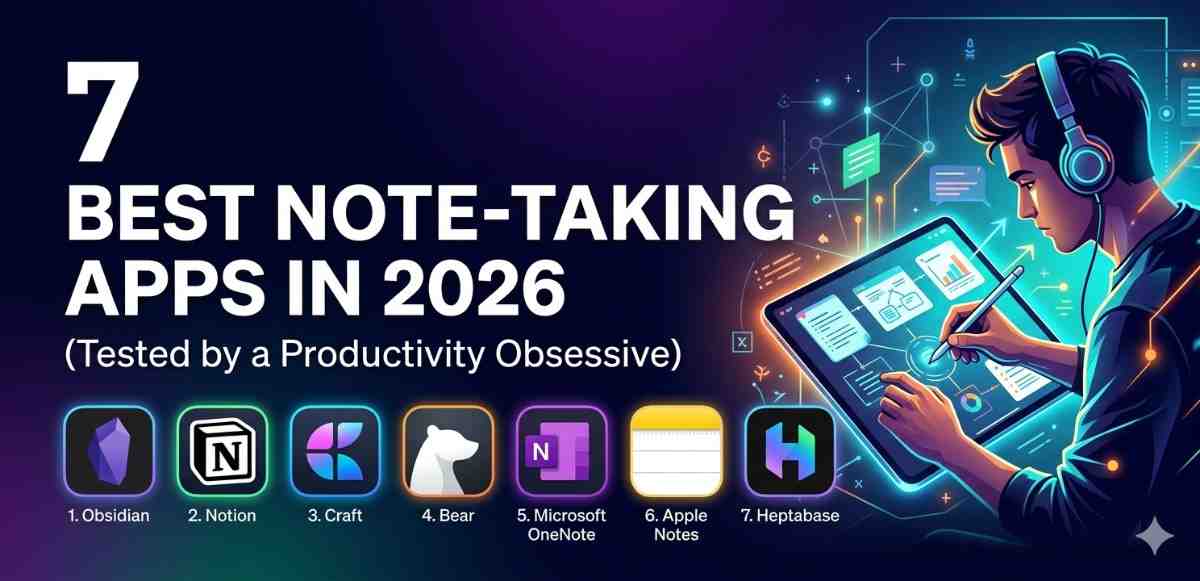
I’ve been testing note-taking apps obsessively for years now. Not as a casual user — I mean actually living inside these apps. Writing grocery lists, research notes, meeting summaries, random 2 AM thoughts, work project outlines. Everything.
And in 2026, the options are honestly better than they’ve ever been. But that also means the choice is harder. So I put together this list based on real daily use — not feature tables or press releases.
Why Choosing the Right Note-Taking Apps Actually Matters
Most people don’t think about this until they’ve already lost something important. A meeting idea that disappeared when the app crashed. A voice memo that didn’t sync. A huge document that couldn’t be found because the search function was terrible.
The app you pick becomes a core habit. It shapes how you think, organize, and recall information. Getting it right from the beginning saves a lot of frustration later.
What I Looked For During Testing
Before jumping into the list, here’s what I actually evaluated. Not marketing claims — real-world behavior.
Capture speed — how quickly can you open the app and write something? If it takes more than 3 seconds, you’ll miss thoughts.
Search reliability — does it find notes by partial words? Older entries? Even inside images or PDFs?
Cross-device sync — does it work equally well on Android phone, tablet, and desktop?
Clutter level — does the interface get out of the way or fight with you?
Offline access — critical for people who travel or have spotty connections.
The 7 Best Note-Taking Apps in 2026
1. Obsidian — Best for Deep Thinkers
Obsidian has changed quite a bit since its early days. In 2026, it remains the gold standard for people who want to connect their ideas, not just collect them.
The concept is simple: every note can link to another note. Over time, you build something like a personal knowledge graph. It sounds nerdy, and honestly — it is. But it’s incredibly powerful once you get into it.
What makes it special is that all your data is stored locally as plain text files. No servers, no subscriptions for core features, no company holding your notes hostage. That’s rare now.
The learning curve is real though. If you just want to jot something down quickly, Obsidian might feel like overkill at first.
Best for: researchers, writers, students building a second brain
Platform: Android, iOS, Windows, Mac, Linux
Price: Free (sync is paid)
2. Notion — Best All-in-One Workspace
Notion has been polarizing for years. Some people swear by it; others find it overwhelming. After spending months with the 2026 version, I land somewhere in the middle — but closer to the “swear by it” camp.
It’s not just a note-taking apps. It’s a workspace. You can build databases, track projects, create personal wikis, manage tasks — all inside one tool. For teams, it’s genuinely excellent.
The Android app used to feel like a second-class citizen compared to desktop. That’s been mostly fixed now. Sync is fast, offline mode has improved, and the mobile editor actually feels smooth.
The downside? It can become a rabbit hole. Spending more time organizing your Notion workspace than actually working is a real trap many users fall into.
Best for: students, freelancers, small teams
Platform: Android, iOS, Web, Desktop
Price: Free tier available; paid plans start affordably
3. Google Keep — Best for Quick Capture on Android
If you want the fastest possible way to save an idea on Android, Google Keep still wins. It opens in under a second. You type, you close, you move on.
It integrates seamlessly with Google Docs, Google Drive, and Google Assistant. If you’re already inside the Google ecosystem — Gmail, Calendar, Drive — Keep fits in without any friction at all.
It’s not made for long documents or complex notes. That’s not what it does. But for short reminders, checklists, voice notes, and clipped web content? Nothing beats it for speed and simplicity.
The color-coding and label system is basic, but it works. Search is reliable. And because it’s Google, the sync is essentially instant across all your devices.
Best for: Android users who need fast, lightweight note capture
Platform: Android, iOS, Web
Price: Free
4. Notesnook — Best for Privacy-Focused Users
Notesnook entered 2026 with serious momentum and for good reason. It’s end-to-end encrypted by default. Not as a premium feature — as the baseline experience.
That means your notes are encrypted before they even leave your device. Notesnook itself can’t read your content. For people storing sensitive information — health notes, legal thoughts, personal journals — this is meaningful.
The editor is clean and distraction-free. The Android app works well, syncs reliably, and includes a solid tagging and notebook system for organization.
It’s fully open source now, which adds another layer of trust for the technically inclined.
Best for: privacy-conscious users, journalists, anyone storing sensitive personal notes
Platform: Android, iOS, Web, Desktop
Price: Free tier available; premium is reasonably priced
5. Apple Notes Taking Apps (Via Third-Party Android Alternatives) — Honorable Mention
Technically Apple Notes doesn’t run on Android. But I’m including it here because many people switching from iPhone to Android ask about alternatives that feel similar — minimal, fast, reliable.
If you’re looking for that same simplicity on Android, Standard Notes is the closest match. It’s clean, distraction-free, end-to-end encrypted, and has been around long enough to prove it’s not going anywhere. The free tier is a bit limited, but the core writing experience is strong.
6. Mem — Best for AI-Assisted Organization
Mem has become one of the more interesting apps in 2026 because of how it handles AI assistance. Instead of you organizing your notes into folders and tags, Mem uses AI to surface relevant notes automatically based on what you’re currently working on.
Write a note about a client meeting today. Later, when you start a new note about the same client, Mem quietly pulls up related past notes. It feels a little magical the first time it works.
It’s not perfect. The AI suggestions can feel off sometimes, and the interface takes some getting used to. But for people who struggle with organization and just want to dump thoughts without worrying about where they go — it’s genuinely useful.
Best for: people who hate manual organization
Platform: Web, iOS, Android (improving)
Price: Paid (free trial available)
7. Joplin — Best Free Open Source Option
Joplin doesn’t have the polish of some other apps on this list. The interface is functional, not beautiful. But what it offers is remarkable for a completely free app.
Full Markdown support. End-to-end encryption. Sync via Nextcloud, OneDrive, Dropbox, or a self-hosted WebDAV server. A desktop app, mobile app, and even a web clipper browser extension.
For technically inclined Android users who want complete control without paying a subscription, Joplin is hard to beat. The learning curve is mild, and the community has built solid plugin support over the years.
Best for: developers, power users, self-hosters
Platform: Android, iOS, Desktop, Web Clipper
Price: Completely free
How to Choose the Right One for You
Here’s a simple way to think about it:
- Just need to capture things fast? → Google Keep
- Want to build a connected knowledge base? → Obsidian
- Need a team or project workspace? → Notion
- Privacy is your priority? → Notesnook or Joplin
- Want AI to handle organization for you? → Mem
- Want free + open source + powerful? → Joplin
Don’t overthink the decision. Pick one, use it seriously for 30 days, then decide. Switching costs are lower than people assume — most apps have import/export tools now.
If you’re curious about productivity tools in general, exploring how Android’s built-in widgets connect with note apps can also improve your workflow significantly. Similarly, understanding how to use Android’s notification system effectively can help you build faster habits around note-taking apps.
A Word About AI Features in 2026
Almost every app in this list has added some form of AI in 2026. Summarization, auto-tagging, writing suggestions. It varies wildly in quality.
My honest take: AI features are most useful when they’re invisible and helpful, not when they’re a selling point plastered on the homepage. Mem does this well. Most others are still figuring out the right balance.
Don’t pick an app solely based on its AI features. The fundamentals — speed, reliability, search, sync — matter more.
Final Conclusion
After all this testing, the truth is: there’s no single “best” note-taking apps. There’s the best one for you, based on how you think, what you need to capture, and how much complexity you’re comfortable managing.
Obsidian wins on depth. Google Keep wins on speed. Notesnook and Joplin win on privacy. Notion wins on flexibility. Mem wins on hands-off organization.
Start with what fits your current habits. A note-taking apps you actually open and use daily will always beat a perfect app you avoid because it feels complicated.